When an asset is changed in the plant or out in the field, it's crucial to modify the existing engineering drawing to incorporate the changes. This process, known as revision management or revision control, is a best practice in engineering design and construction projects. Once the edits have been made, the existing drawing is superseded and replaced by the new version. In a Drawing Management System, these kinds of changes are completed within a document workflow and often require the engineering review and approval that document control exists to record.
A common practice is to store the revision number inside the drawing title block and ensure that this revision is available to anybody viewing the file either within the system or externally. The drawing revision and drawing number make up a unique reference to a drawing - when making a change, you need to know both the drawing number and the revision you are editing (generally the most recent revision). Recording those references in a drawing register keeps the current revision of every drawing visible in one place.
free template · xlsx + csvTrack every drawing by number, current revision, status, and the transmittal that issued it.Drawing register template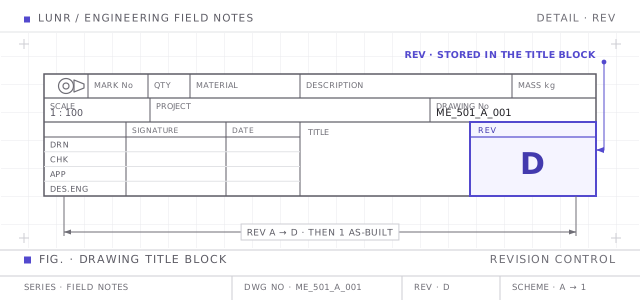
Letters First, Then Numbers
There are many kinds of revision numbering schemes. One that we commonly see uses alpha characters for the drawing revisions prior to when the drawing is released as-constructed, then moves to a numeric numbering system for operations and maintenance changes. A drawing runs A, B, C, D through design and construction, and once it has been handed over it starts a numeric sequence that carries every change made for the rest of the asset's life. This clear and consistent numbering system ensures that everyone involved in the project understands the status of a drawing at any given time.
As an example, drawing ME_501_A_001.dwg may start as revision A and move through to revision D during the project phase. Once it's submitted as-built, it moves into the numeric sequence. Revision numbering schemes like this are useful methods to ensure that everybody understands exactly where a drawing is at in its lifecycle and help avoid costly errors and lost time.
Which Revision Letters to Skip
Not every letter is available. The convention, set out in ASME Y14.35 for the revision of engineering drawings, uses upper case letters in sequence from A and omits I, O, Q, S, X, and Z. The reason is legibility on a printed, faxed, or scanned sheet. I reads as 1, O and Q read as 0, S reads as 5, and Z reads as 2. X is left out because a drawing office commonly uses it to mark a field that still needs input.
That leaves twenty usable letters. When the single letters run out at Y, the sequence continues with double letters, AA, AB through AY, then BA, BB, and so on.
O and the digit 0 are the pair worth the most care, because a letters-then-numbers scheme puts both alphabets on the same drawing over its life. Dropping O from the letters removes the ambiguity for good.
What the Initial Revision Should Be
Every drawing carries a revision from the moment it exists, so a sheet with a blank revision field is immediately visible as uncontrolled. Which value goes in that field on day one depends on the scheme:
- Under a letters-then-numbers scheme, a new drawing starts at revision A, the first issue for comment or review.
- Under a purely numeric scheme, it starts at rev 0 or rev 1, following the rule in the next section.
- Under the ISO 19650 revision codes used on projects working to the UK BIM framework, it starts at P01, where P marks a preliminary issue. The preliminary sequence runs P01, P02, and onwards until the information becomes contractual and moves to C01.
Some offices issue a drawing at revision A only once it has been checked, and use a separate work in progress marker before that. Others treat revision A as the first thing that leaves the drafter's desk. Both work, provided the whole project agrees which one is in force.
Rev 0 vs Rev 1
Rev 0 and rev 1 are both used for the first numeric revision, and which one is right depends on the convention your organisation has written down. Two are common:
- Start at 0. Rev 0 is the first issue in the numeric sequence, usually the as-constructed handover, and rev 1 is the first change made after the asset is in service.
- Start at 1. Rev 1 is the as-constructed issue and there is no rev 0 at all. This suits a scheme that has already dropped the letter O to avoid confusion with zero, since the digit never appears in a revision.
Neither is more correct than the other, and both are in daily use. The damage comes from running both in one register, because a reader who sees rev 0 then cannot tell whether it means the approved baseline or a drawing that has not been issued yet. Pick one, record it in your document numbering standard next to the drawing number format, and hold every discipline to it.
Minor Revisions Within a Change Cycle
During a single change cycle on a drawing, the file may go through a number of iterations as it's reviewed and adjusted to meet the project requirements. This is often referred to as a minor revision and is represented with an alpha.numeric format like A.1 or 1.1. This minor revision scheme is consistent with the guidance outlined in the UK BIM framework ISO 19650-2 around revision management within a CDE (Common Data Environment). For reference, the relevant section of the guide is 5.1 (Revision Control during Work in Progress - WIP).
What Happens to the Superseded Revision
Issuing a new revision does not delete the old one. The previous revision becomes a superseded drawing, retired from use, marked so nobody works from it by mistake, and kept on the record.
Keeping superseded revisions matters for two reasons. The first is traceability: when a fault turns up in the plant, you need to know which revision the crew held on the day, which means the register has to answer what was current in March last year, not only what is current now. The second is evidence. The issued record shows what was designed, approved, and built, and a revision deleted to tidy up a folder is evidence gone.
The practical test is whether a superseded revision is hard to reach and easy to find. Hard to reach, so it never surfaces in a routine search or gets attached to a transmittal by accident. Easy to find, so an auditor or the next project team can retrieve it and see exactly why it was replaced. Deleting old revisions fails both halves, and leaving them loose in the same folder as the current sheet fails the first. An engineering document management system passes both, because every revision hangs off the one drawing number and only the current one is served.
Automating the Revision Number
Drawing Management Systems, such as Lunr, make it easier to follow best practices like this with engineering drawing-specific features and offer significant benefits. These systems simplify the revision process, ensure accurate and up-to-date information, and enhance collaboration among project stakeholders. Two features that exemplify these benefits are:
- Automated revision numbering: Each time a drawing goes through workflow, the system should automatically increment the major and minor revisions to avoid the need for somebody to remember to make the change manually.
- Title block integration: Ideally, the revision should be synchronised back to the drawing title block automatically to ensure that the system and the drawing file are aligned.
Both features come built into modern drawing management software, so the revision on screen always matches the revision in the file.