The engineering record for the network, the substations, and the plant.
A utility documents its network across decades of construction, refurbishment, and repair: network plans, substation drawings, single line diagrams, cable schedules, and the layouts and P&IDs for every generation plant. Lunr puts that record under revision control, keeps it searchable back through the scanned archive, places each document against the asset it covers, and makes contractor handover arrive complete.
10M+ documents under management · Hosted in Australia and the US · SAML · Full audit trail · Export anytime
Organised by network, substation, and plant.
A substation carries protection, civil, and structural drawings across decades of works, and a generation plant holds its own process, mechanical, and electrical set. Group every facility into a Portfolio, keep each drawing under revision control, and the superseded copy is never mistaken for the current one.
- Keep decades of drawings for the network, every substation, and every plant under revision control.
- Group the asset base into Portfolios by site, plant, and network, each carrying its own asset information.
- Automatic document and version numbering, applied in your register format as records are booked in.
- A full revision history on every drawing, so any change through a refurbishment can be traced and evidenced.
- Export all metadata, drawings, and models at any time, so the record stays with the utility.
Portfolios · revision control · automatic numbering · audit log · export anytime
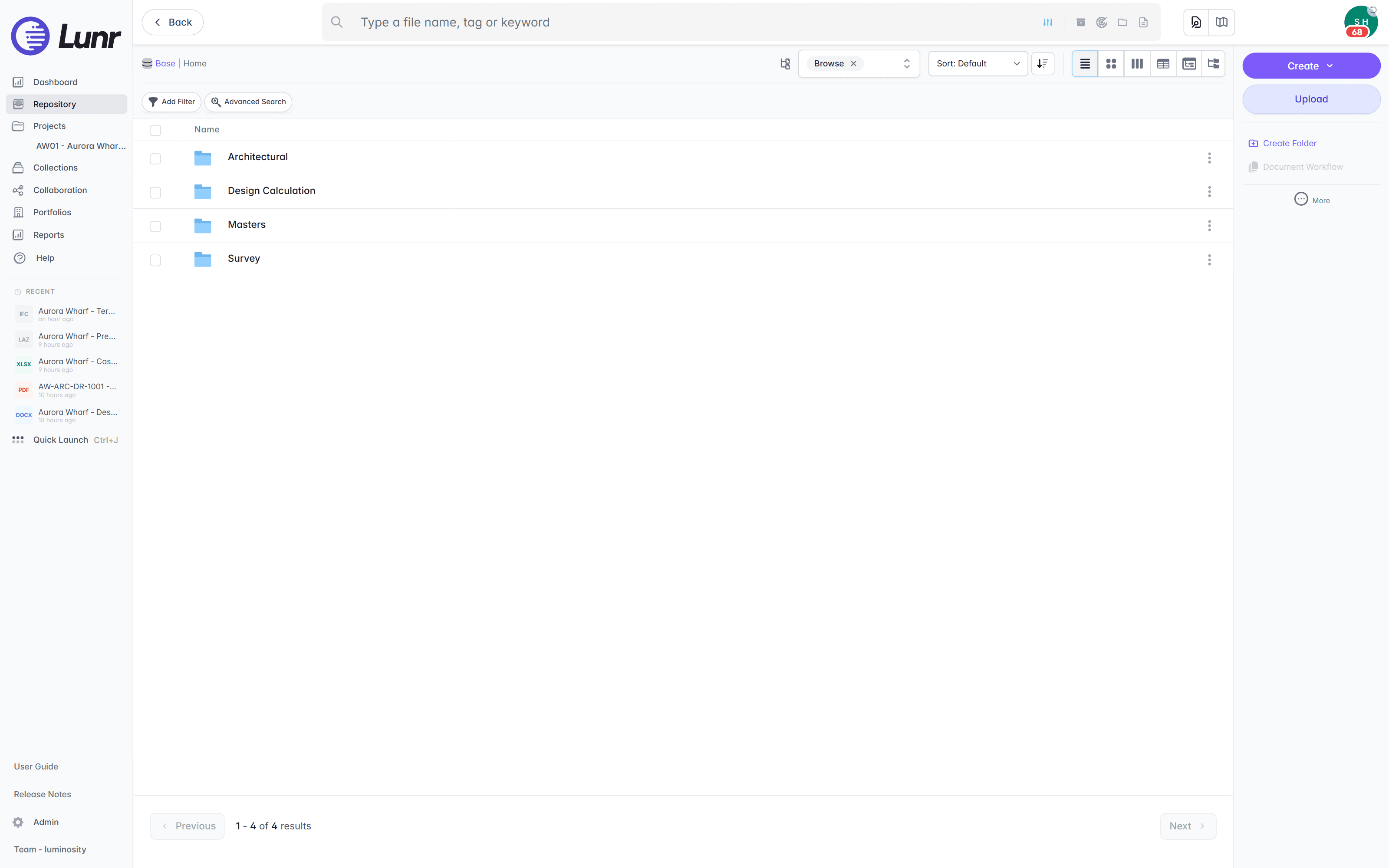
An audit trail that answers an assurance review.
Every workflow transition, approval, revision, issue, and tag edit lands on one timeline against a named person and a revision. Filter the trail to the events a review asks about, and export the evidence.
revision control · approvals · audit log · workflow transitions · exportable evidence
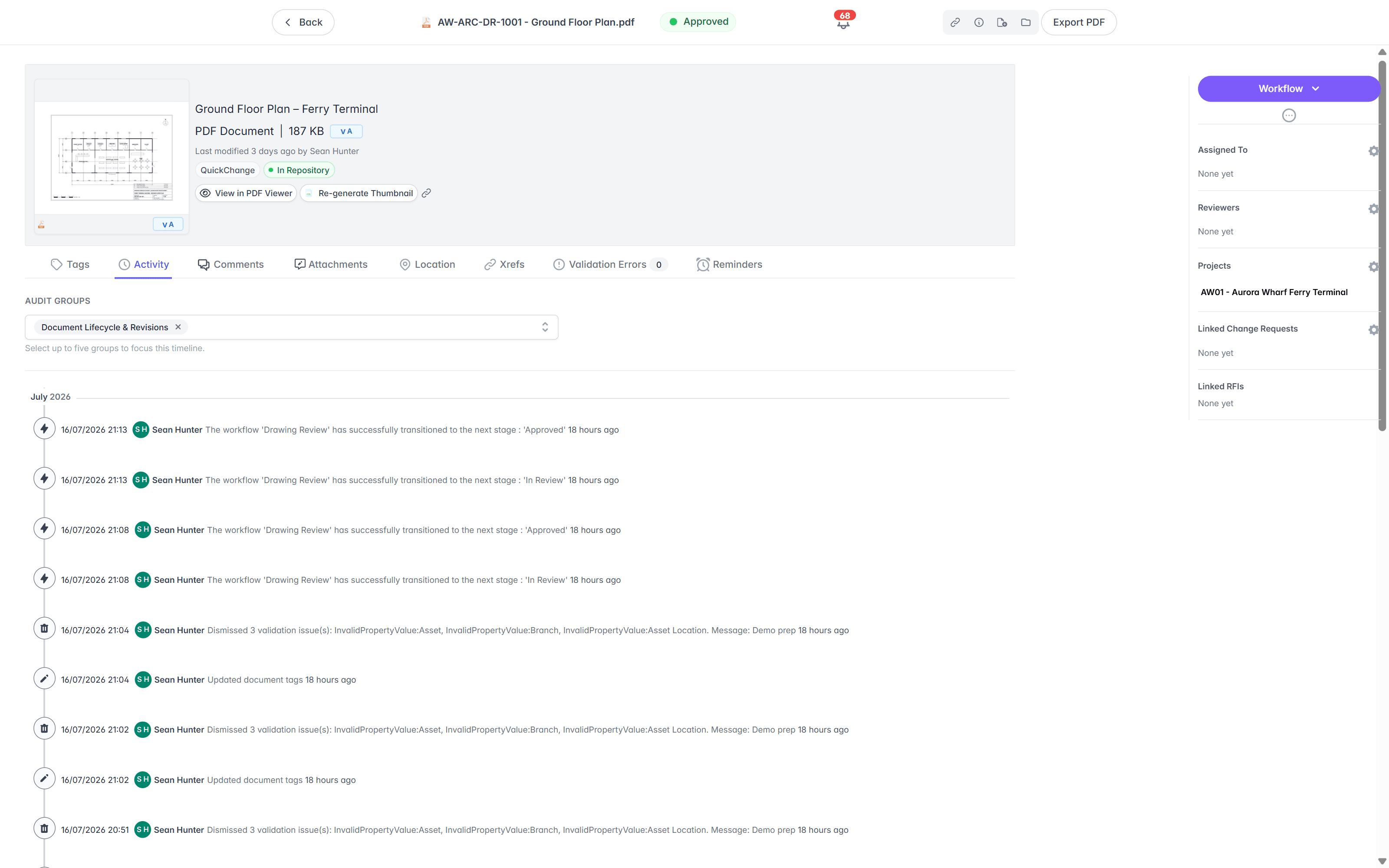
Search the words inside a scanned substation drawing.
A network archive runs back to sheets drawn long before CAD, and much of it is scanned. XRAY runs OCR and full-text search across every drawing, scans included, so a circuit name, an asset number, or a note printed on a sheet is findable whether the drawing was saved this morning or scanned from a 1970s archive.
- OCR and AI full-text search across every DWG, DGN, RVT, PDF, and scanned image.
- Find a circuit name, an asset number, or a note printed inside the sheet, not just the file name.
- Deep XRAY re-reads a dense sheet in high-resolution tiles, from 2×2 up to 4×4, so faint or crowded text still resolves.
- Filter results by metadata, tags, and revision to narrow a large network archive fast.
OCR · AI full-text search · deep XRAY tile re-scan · metadata and tag filters
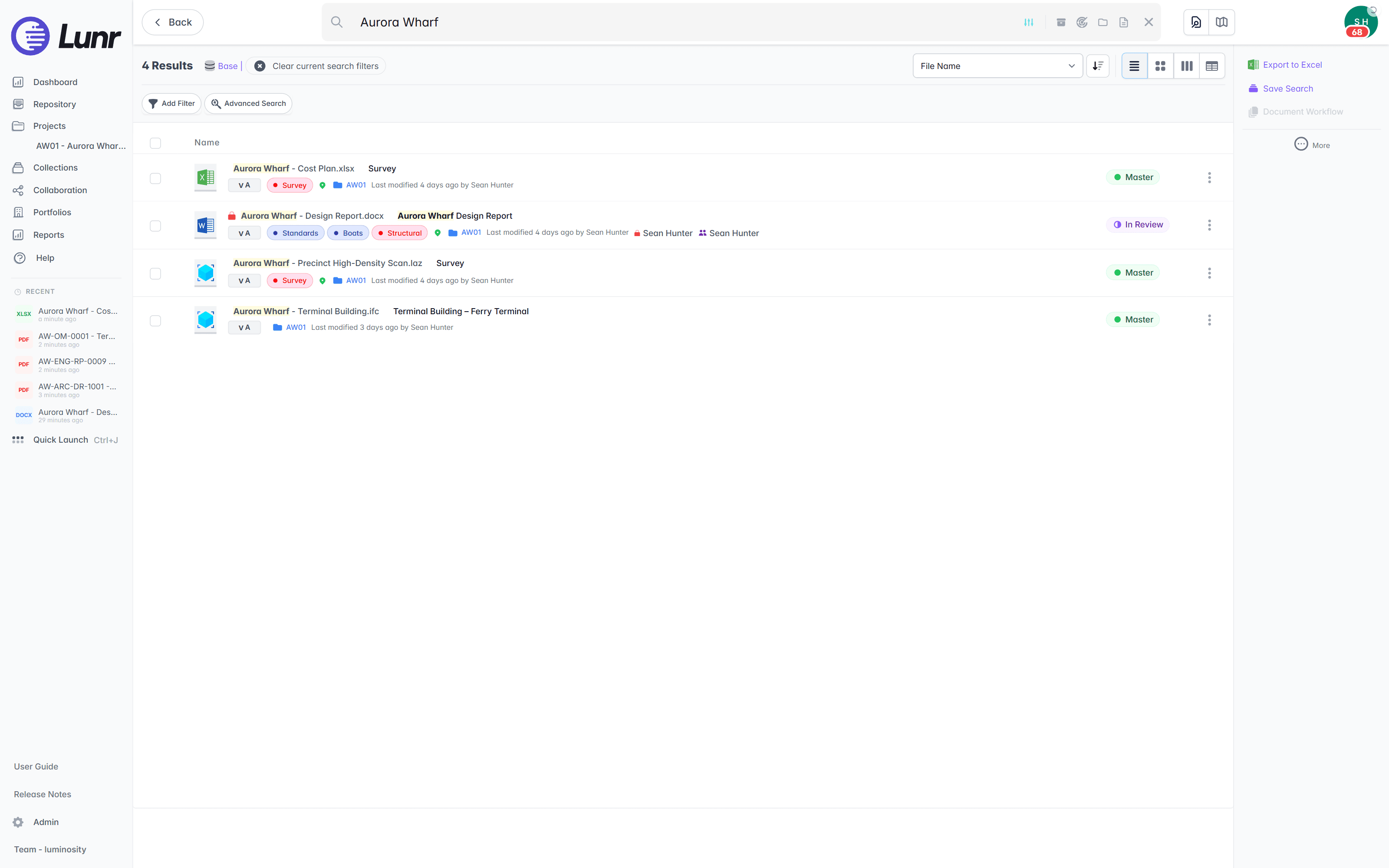
Crews see the drawing without a CAD licence.
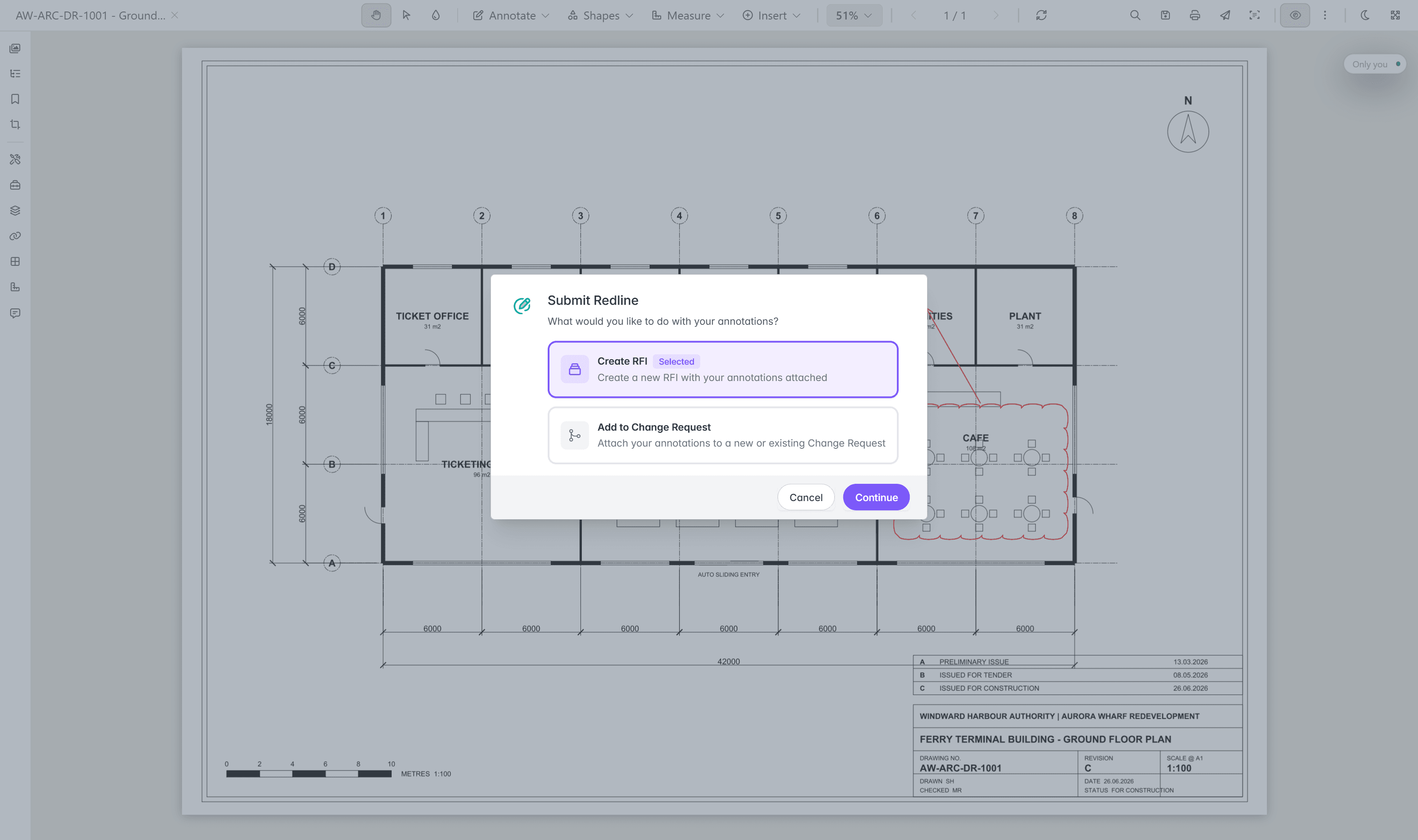
Most of the people who need a network or plant drawing do not run CAD. The Rift viewer renders DWG, DGN, and PDF at full fidelity in the browser, with layers, measurement, and markup, so operations, maintenance, and asset staff read the sheet without a seat. Models open in Foundry, point clouds in Nimbus.
- View DWG, DGN, RVT, and PDF in the browser, with no CAD licence and nothing to install.
- Toggle layers, measure, and mark up the drawing straight in the viewer.
- Open BIM models in Foundry and scan data in Nimbus from the same record.
- Turn a redline into a change request or an RFI without leaving the viewer.
browser viewers · layers · measurement · markup · no CAD licence
Try the viewers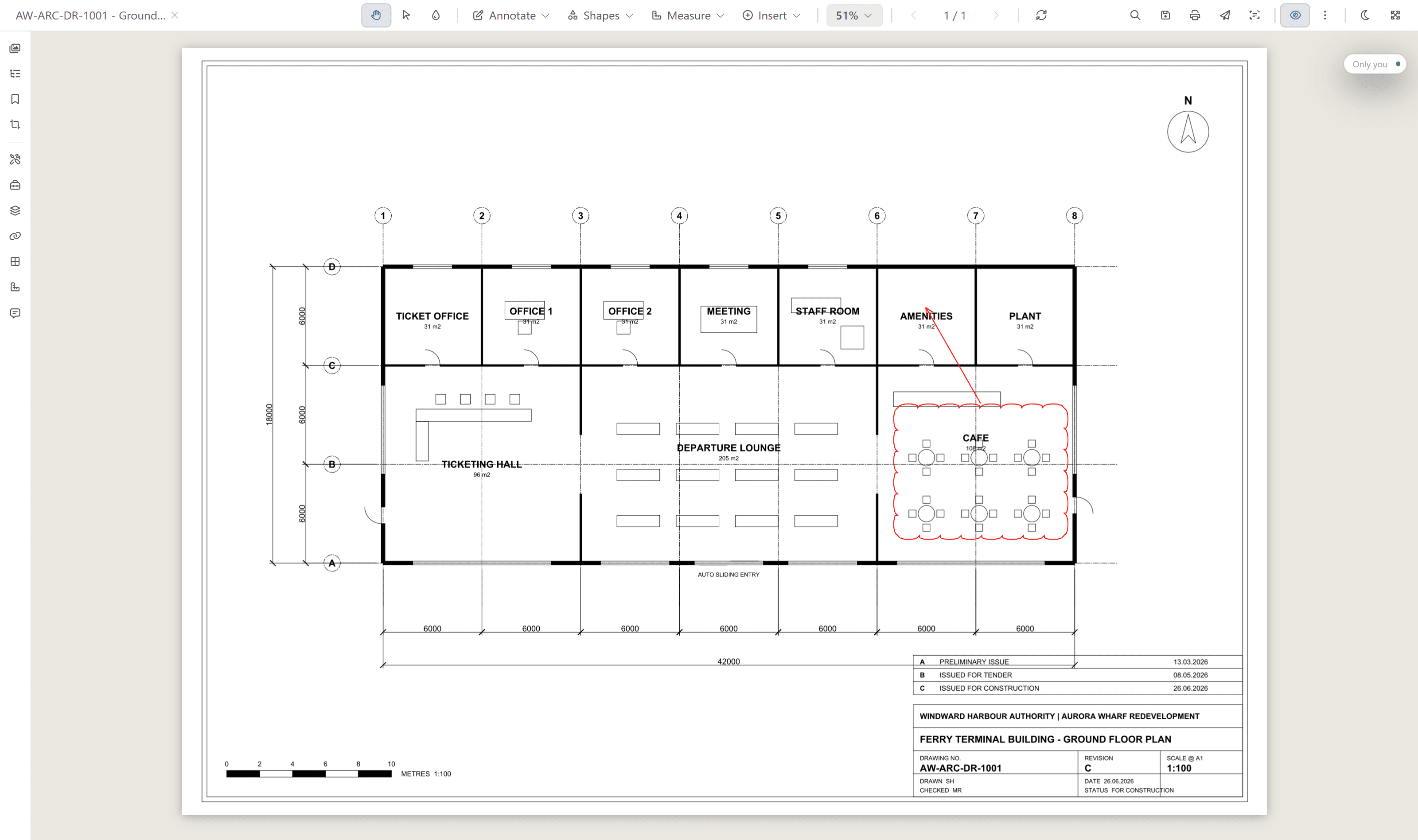
A substation basement has no reception.
Download the documents a job needs as a collection before the crew leaves, and read them where there is no signal. The collection carries an expiry set by your organisation, access refreshes when the handset next signs in online, and the files held on the device carry app-level and file-level encryption.
See the mobile apps- Take documents offline as a collection, with their metadata, from the iPhone and Android apps.
- Scan the QR code in a printed title block on site, and Lunr opens the live controlled document at its current revision.
- Raise a comment, a change request, or an RFI from the field, and attach a photo taken with the camera.
- Move a controlled document to its next state on the workflow your organisation configured.
offline collections · encrypted on device · document QR · field change requests · iOS and Android
As-constructed sets that arrive complete on every project.
Augmentation, replacement, and connection projects are delivered by contractors and consultants, and the record only stays whole if handover is checked on the way in. Validate each package against a manifest, so a missing as-constructed drawing is caught on upload, not discovered on the next project.
- Validate each handover package against a manifest, and read title-block tags into metadata.
- Issue tracked transmittals, and follow each one through sent, received, and acknowledged.
- Run change requests that hold, forward, and close, raised straight from a redline.
- Move deliverables through configurable review and approval workflows.
- Contractors and consultants deliver as Collaborators, and see only what you grant them.
manifest validation · transmittals · change requests · configurable workflows · Collaborators
Find the drawing from the network map, or from the work order.
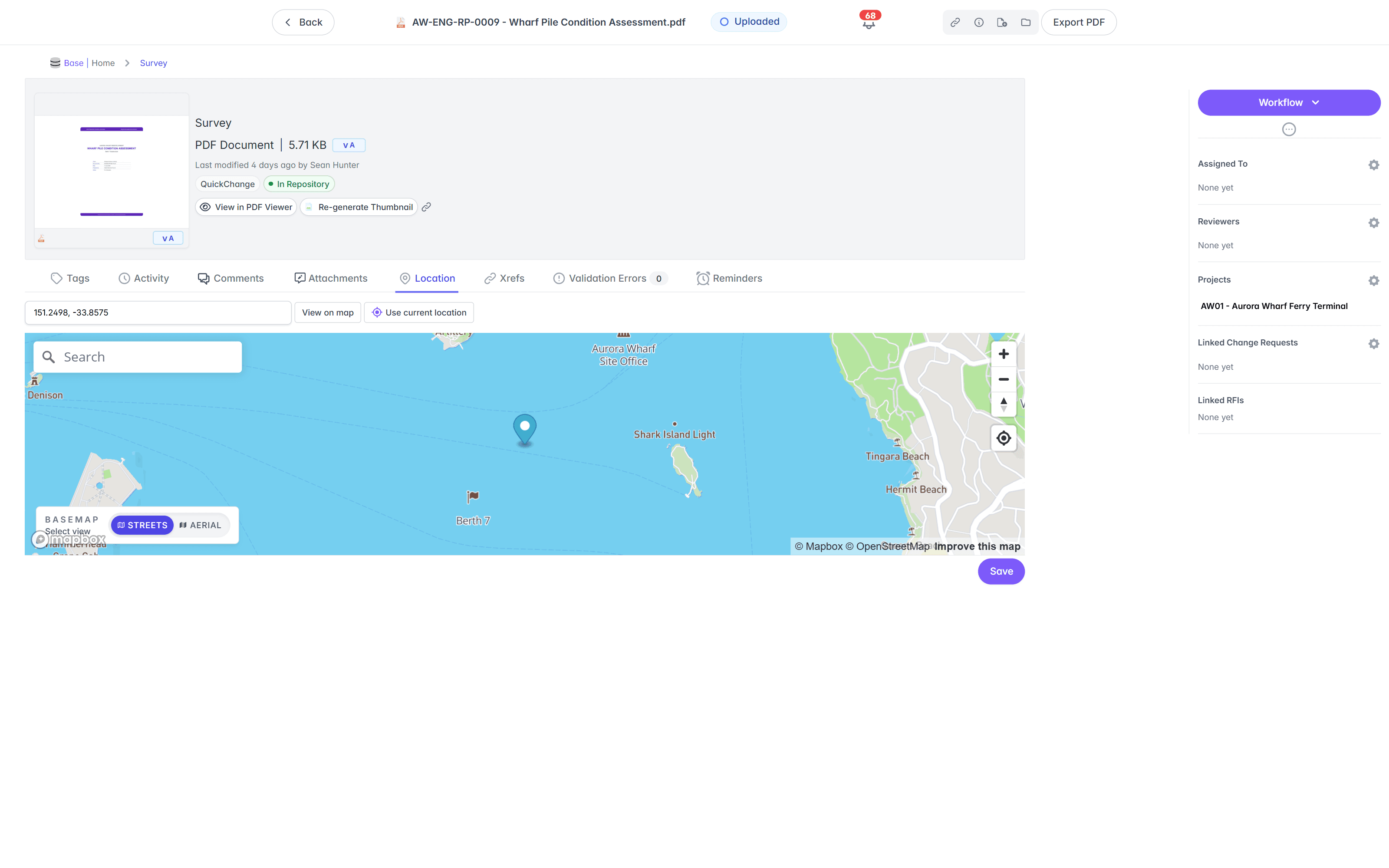
A utility’s asset base is spread across a service territory, and the two places staff already start are the GIS and the work order. Lunr meets both: each document carries a location per asset synced from your GIS, and your asset and works management systems resolve a document link from an asset ID over the REST API.
Your GIS layers, and a location on every document.
A document version holds one location for each asset it covers, so a sheet spanning a feeder, several poles, and a substation carries a point, line, or polygon for each, keyed on the GIS asset ID held as a document tag.
- Resolve asset IDs held as document tags against your ArcGIS, as part of document synchronisation.
- Enrich document metadata from GIS attributes on the way through, including street, suburb, lot number, and local government area.
- Render your ArcGIS Online feature-service layers live on the Lunr map, queried for the current view, with nothing copied into Lunr.
- Draw a polygon around a substation, along a feeder, or around a plant, and Lunr returns every document inside it.
one location per asset · GIS asset ID tags · metadata enrichment · live ArcGIS Online layers · polygon search
See the Esri and ArcGIS integration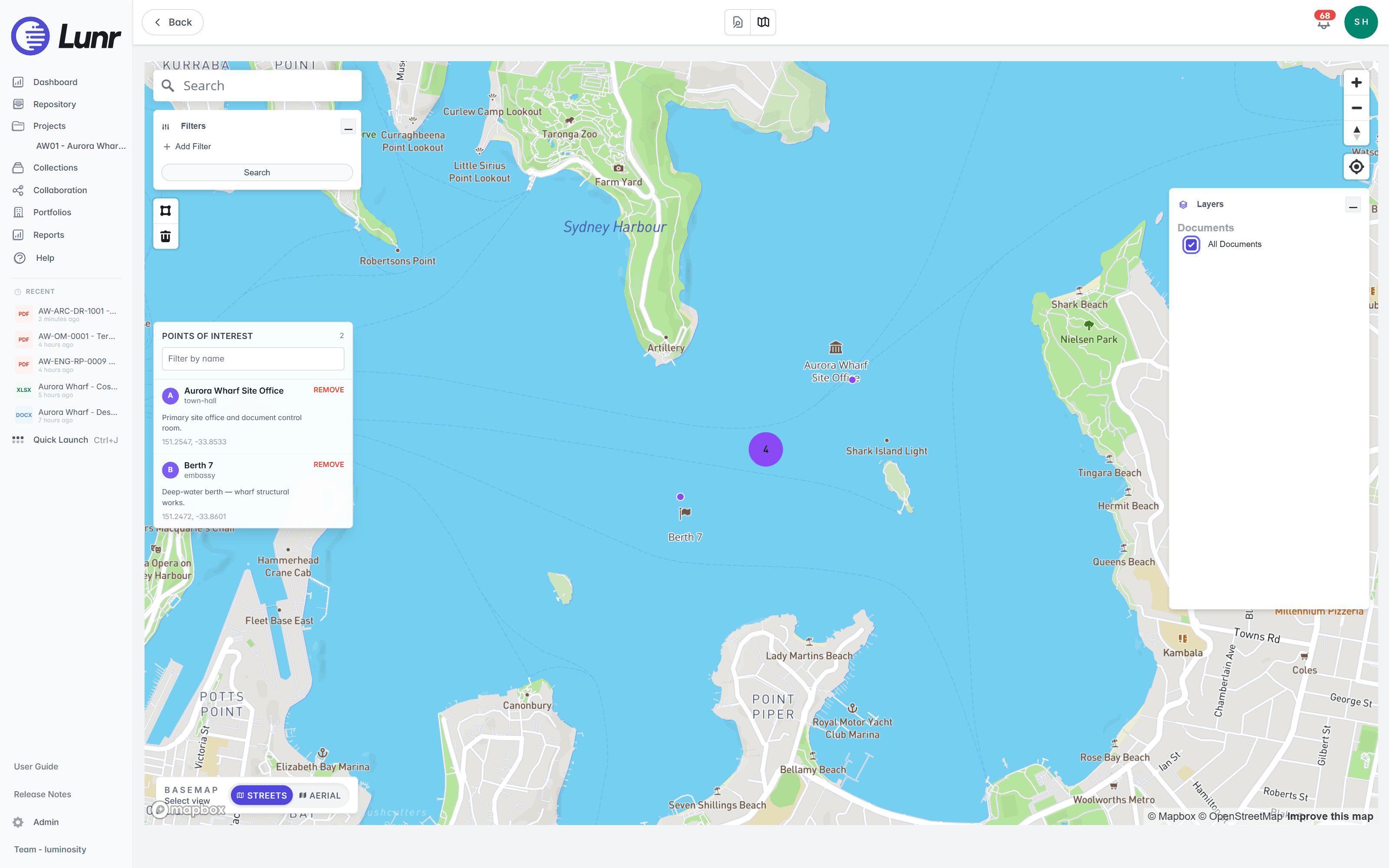
Open the current drawing from a work order.
Your asset and works management systems run the asset register and the work orders. Lunr holds the drawing record against the same asset IDs, and the two meet over the REST API. Pass an asset ID, get the documents that cover it.
- Resolve a document link from an asset ID, so a work order opens the current revision rather than a superseded sheet.
- Query the drawing register over the REST API, so the asset system reads Lunr rather than holding its own copy of the documents.
- Serve document locations as a GeoJSON FeatureCollection, and add that endpoint to ArcGIS as a layer to find Lunr documents from the GIS side.
- Scope each integration during implementation, against your asset IDs and your tag scheme, rather than installing a packaged connector.
REST API · asset ID to document links · GeoJSON layer · TechnologyOne · WorxOnline · Maximo · scoped in implementation
Built to clear a utility tender.
The answers a tender panel and a CISO look for are already in place. Pricing is shaped to your organisation, with every capability included as standard.
Data centres in Australia and the US. Your instance sits in the region you require, so records stay onshore.
Lunr is hosted and implemented by Onset Design, which maintains ISO/IEC 27001:2022 compliance, and Lunr runs on that certified infrastructure. The certification is held by Onset Design, the partner that hosts and operates Lunr. Read the security page.
Staff sign in with your identity provider, so access follows your joiner and leaver process. Contractors join as Collaborators.
Every controlled document carries a full revision history and audit log, ready for an assurance review.
Export all metadata, drawings, and models at any time. The network record stays with the utility.
Every capability is standard, with pricing shaped to your organisation. Evaluation is fast, not a discovery project.
An accessibility statement is published and maintained for the browser workspace.
Read the accessibility statement, or connect the GIS, CAD, and asset management systems your network already runs on the connectors page.
Trusted with the record owners keep for decades.
Utilities are one of the sectors already running their engineering record on Lunr, and the team behind your implementation has spent twenty years moving those records at Australian asset owners.
Higher education, utilities, infrastructure, life sciences, and metals and mining run their engineering record on Lunr, and Lunr has been selected through RFQ tender processes. We name the organisations in a walkthrough, where we can talk through the work.
Read how Lunr is securedof engineering document migrations at Australian asset owners, across utilities, power generation, manufacturing, mining, and education. Millions of documents have moved under this method, off network drives, SharePoint, and legacy document systems.
See how implementation runs“Lunr is a simple solution that provides the flexibility to develop the system to our needs. Lunr is simple to use, and minimal training is required.”
10M+ documents under management on Lunr today.
Read the University of Canberra case studyQuestions utilities ask about document management.
How the record is held today, what a utility’s system has to cover, how it fits the GIS and the works system, and where the data sits.
- How do utilities manage engineering documents today, and how is Lunr different?
- Most utilities keep drawings in nested folders on SharePoint or a network drive, split across the network, each substation, the generation plants, disciplines, and outsourced engineering consultants. The current revision is a guess, superseded sheets stay in circulation, the text inside a scanned substation drawing is invisible to search, and there is no audit trail. Lunr puts every drawing under revision control in one register, keeps the superseded copy marked, searches the words printed inside each sheet, and logs every change against a named person and a revision. The University of Canberra moved more than 20,000 documents off SharePoint onto Lunr for this reason.
- What does an engineering document system for a utility have to cover?
- A utility's record is not one site. It covers a distributed network of lines, cables, and substations, plus concentrated plants that carry their own process, mechanical, electrical, and civil sets, and it runs across decades of construction, refurbishment, and repair. So the system has to identify a document by its number rather than its file name, keep every revision with the superseded copy marked, read the text inside a sheet scanned before CAD existed, place each document against the asset it covers, and take contractor handover without losing anything. Lunr does all five in one register, and holds more than 10 million documents today.
- Can Lunr work as a document management system for the energy sector?
- Yes. Utilities are one of the sectors already running their engineering record on Lunr, and the implementation team has spent twenty years migrating engineering document records at Australian asset owners across utilities, power generation, manufacturing, mining, and education. A generation plant is documented the same way a treatment plant or a processing plant is: process, mechanical, electrical, and civil drawings held as controlled documents, revision by revision, with a full audit trail behind every change.
- Can crews find documents across a distributed network?
- Yes. A document version holds one location for each asset it covers, as a point, a line, or a polygon, keyed on the GIS asset ID held as a document tag, and the sync resolves those tags against your ArcGIS as part of document synchronisation. Your ArcGIS Online feature-service layers render live on the Lunr map beside your document layers, queried for the current view with nothing copied into Lunr. Draw a polygon around a substation, along a feeder, or around a plant, and Lunr returns every document inside it.
- How does Lunr work alongside our GIS and our asset or works management system?
- Lunr holds the engineering record while those systems run the asset register and the work orders, and the two meet over the REST API. Pass an asset ID and get the documents that cover it, so a work order opens the current revision rather than a superseded sheet. Systems such as TechnologyOne, WorxOnline, and Maximo connect this way, scoped to your asset IDs and your tag scheme during implementation rather than installed as a packaged connector. Lunr also serves document locations from the REST API as a GeoJSON FeatureCollection, so you can add that endpoint to ArcGIS as a layer and find Lunr documents from the GIS side.
- Can Lunr search inside our scanned network and substation drawings?
- Yes. XRAY runs OCR and full-text search across every drawing, scans included, so a circuit name, an asset number, or a note printed on a sheet is findable whether the drawing was saved this morning or scanned from a 1970s archive. Deep XRAY re-scans a dense sheet at high resolution, tile by tile, so faint or crowded text still resolves. Filter results by metadata, tags, and revision to narrow a large network archive fast.
- How does contractor handover work on a capital works programme?
- Every augmentation, replacement, and connection project is delivered by contractors and consultants, and the record only stays whole if handover is checked on the way in. Validate each package against a manifest, so a missing as-constructed drawing is caught on upload rather than found on the next project. Lunr reads title-block tags from every sheet into metadata, applies your register numbering as records come in, and issues tracked transmittals through sent, received, and acknowledged. Contractors deliver as Collaborators and see only what you grant them.
- Where is our data hosted, and how do staff and contractors sign in?
- Lunr runs from data centres in Australia and the US, and your instance sits in the region you require, so records stay onshore for data sovereignty. Staff sign in over SAML with your identity provider, and external parties join as Collaborators with access to only what they need. Lunr is hosted and operated by Onset Design, which maintains ISO/IEC 27001:2022 compliance. Export all metadata, drawings, and models at any time, so the record is never locked in.
Ten more sectors, documented the same way.
Each page below covers the documents that sector holds, the archive it inherited, and the systems its record has to sit beside. The platform is the same one, configured to the assets you run.
buildings · plant rooms · services
University estates
A campus estate of DWG, DGN, and RVT under revision control, with the scanned archive searchable and contractor handover checked on every project.
plants · pump stations · mains
Water authorities
Treatment plants, pump stations, reservoirs, and the reticulation network, with one location per asset synced from your GIS.
roads · water · buildings
Government and councils
Roads, water, buildings, and parks under revision control, so the record stays with the public owner through staff turnover and outsourced engineering.
civic buildings · roads · drainage
Local councils
Civic buildings, roads, and drainage assets linked to council GIS and asset systems, with the inherited scanned archive searchable.
corridors · signalling · structures
Rail operators
Corridors, signalling, and structures under revision control, with scanned legacy drawings searchable inside the sheet.
airfield · terminals · services
Airports
Airfield, terminals, and services under revision control, with decades of scanned drawings searchable inside the sheet.
pit · fixed plant · tailings
Mining operators
Mine site and processing plant drawings through every expansion, and a closure record that stays with the operator after the mine is gone.
equipment · P&IDs · layouts
Manufacturing
Mechanical, electrical, P&ID, and layout drawings, with the current revision readable at the machine on a QR scan.
wards · plant · services
Hospitals and healthcare
Engineering services drawings for a hospital campus, kept complete through constant refurbishment and searchable back through the scanned archive.
cleanrooms · HVAC · P&IDs
Life sciences facilities
Cleanroom layouts, HVAC, water systems, and P&IDs for a pharmaceutical plant, laboratory, or biotech site, with every superseded revision kept.
For what every one of these sectors has in common, and how an owner’s record differs from a delivery system, read engineering document management.
See it on your own network and plant drawings.
Book a walkthrough with someone who knows what a transmittal and an as-constructed set are, and we will map Lunr to your network.
10M+ documents under management · Hosted in Australia and the US · SAML · Full audit trail · Export anytime
- entity
- Lunr Labs Pty Ltd
- location
- Melbourne AU
- workspace
- documents.lunr.app
- rev
- 2026