Engineering document management, from the drawing number to the audit trail.
For the document controllers and engineering managers who answer for the record. An engineering document management system holds every controlled document as a numbered, revisioned record, so the current revision is never a guess and every change carries a name and a date. Lunr does that for a DWG, an IFC model, a Word method statement, and an Excel schedule alike.
10M+ documents under management · Hosted in Australia and the US · SAML · Full audit trail
What an engineering document management system does.
An EDMS is the controlled system an organisation keeps its engineering documents in. It gives each document an identity that outlives the file: a number from your scheme, a discipline, a current revision, a status, and the record of every change made to it. Ask the register for a document number and you get the controlled copy, whatever format it was drawn in and whoever last touched it.
Generic document management stops short of that. It versions a file and routes it for approval, which is the right tool for a policy or a report. A drawing set needs the five marks in the panel, and an owner who has to produce a controlled document and its history years later needs all five to have held the whole time. The glossary carries the full EDMS definition, including why the acronym expands two ways.
- 01Revisions are the object
A revision is an issued state, with a letter or number printed on the sheet, an approver recorded against it, and the superseded copy kept and marked.
- 02The number is the identity
The document number comes from your scheme and stays with the record for the life of the asset, so every revision belongs to the same document rather than to a file name.
- 03Issue is controlled
A document leaves on a tracked transmittal that records what was sent, to whom, and against which revision, without handing over the repository.
- 04Drawings open natively
DWG, DGN, RVT, IFC, and PDF open in the browser with layers, measurement, and markup, and title-block attributes are read into the record.
- 05The trail writes itself
Every workflow transition, tag change, and validation is logged against a named person and a revision, and the trail exports when an auditor asks for it.
The vocabulary is load-bearing here, because a procurement document that says version history and a drawing office that says revision control are describing different things. The same goes for the difference between a folder name and a document number, and between a shared link and a transmittal.
Where a general document system stops.
A network share, a SharePoint site, and most business content platforms handle an Office document well. Put a drawing set through one and the gaps show in the same six places every time, usually on the day somebody asks which revision was issued for construction.
The document number identifies the record, and every revision belongs to that number for decades.
The file name and its folder identify the file, and a rename breaks the trail.
An issued state, marked on the sheet, with an approver against it and the superseded copy kept.
A version history, recording that somebody saved a change.
DWG, DGN, RVT, IFC, and PDF open in the browser, with external references resolved.
A CAD file is an attachment, and opening it needs the authoring application.
A tracked transmittal records what was sent, to whom, and against which revision.
A share link, or an attachment on an email.
Full-text search reaches the words drawn on the sheet, scans included.
File names, and whatever metadata somebody typed.
Every transition, approval, and tag change is logged against a person and a revision.
Access logs, and an email thread.
Keep the general system for the documents it suits. Most owners run both, with Office collaboration where it already is and the engineering record on Lunr. The SharePoint comparison sets out where that line falls in practice, and the same line runs through OpenText and M-Files.
One numbering scheme, and a history that keeps the old sheet.
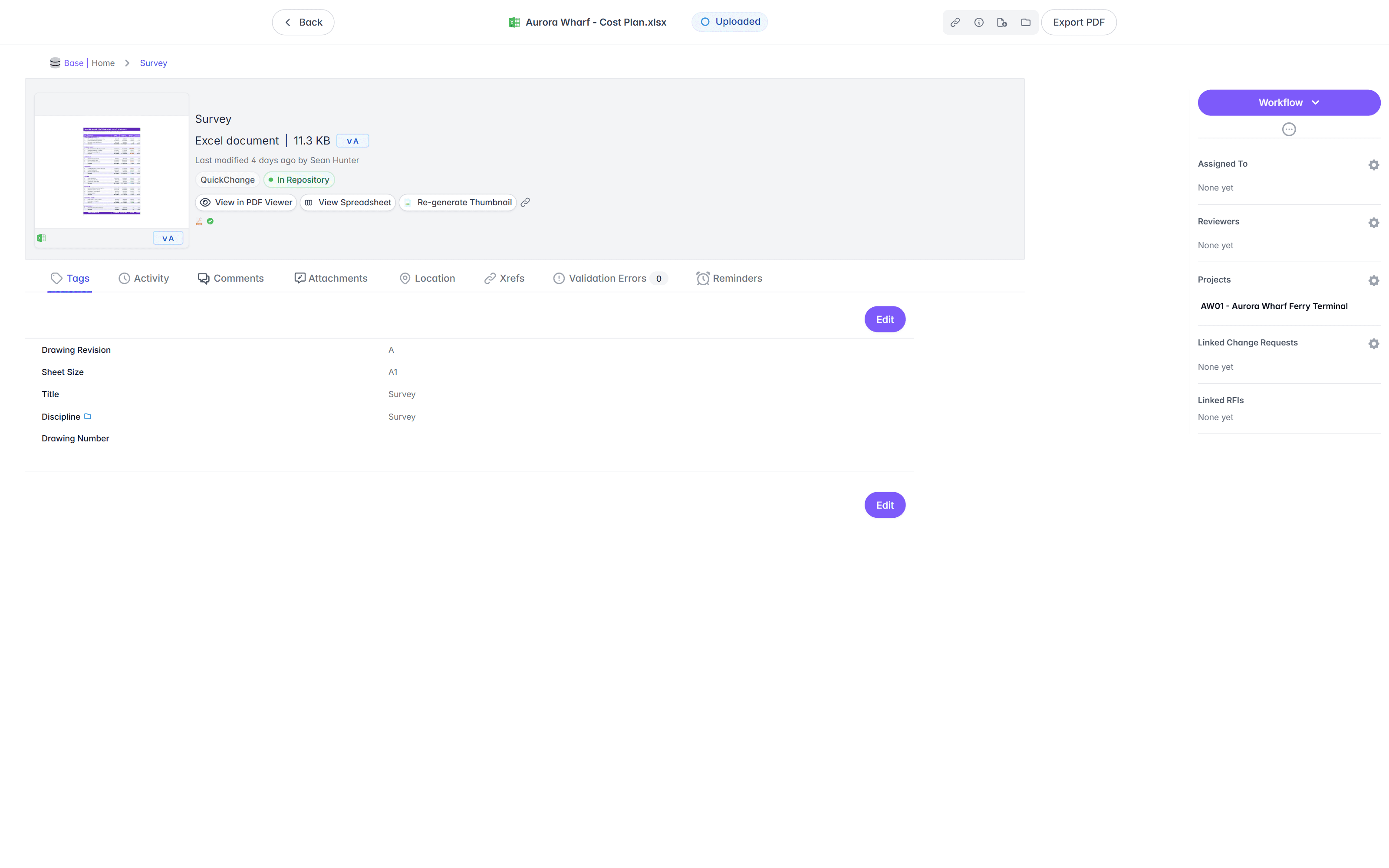
Book a document in and Lunr applies your numbering scheme, reads the title block and metadata tags into the record, and starts a revision history. A DWG, a PDF, a Word method statement, and an Excel schedule all sit under the same control, each with a number, a discipline, and a current revision.
- Automatic document and revision numbering, applied to your register format as documents are booked in.
- Title-block and metadata tags read off each document, so nobody retypes the number, the discipline, or the revision.
- Every revision kept, with the superseded copy marked and left on the record rather than overwritten.
- Compare two revisions side by side, or overlay them to see what moved.
- DWG, DGN, RVT, PDF, IFC, Word, and Excel held under one scheme, so the register covers the whole set.
automatic numbering · title-block tag parsing · discipline and metadata · revision history · superseded marking · compare and overlay
Configurable workflows, on an audit trail that writes itself.
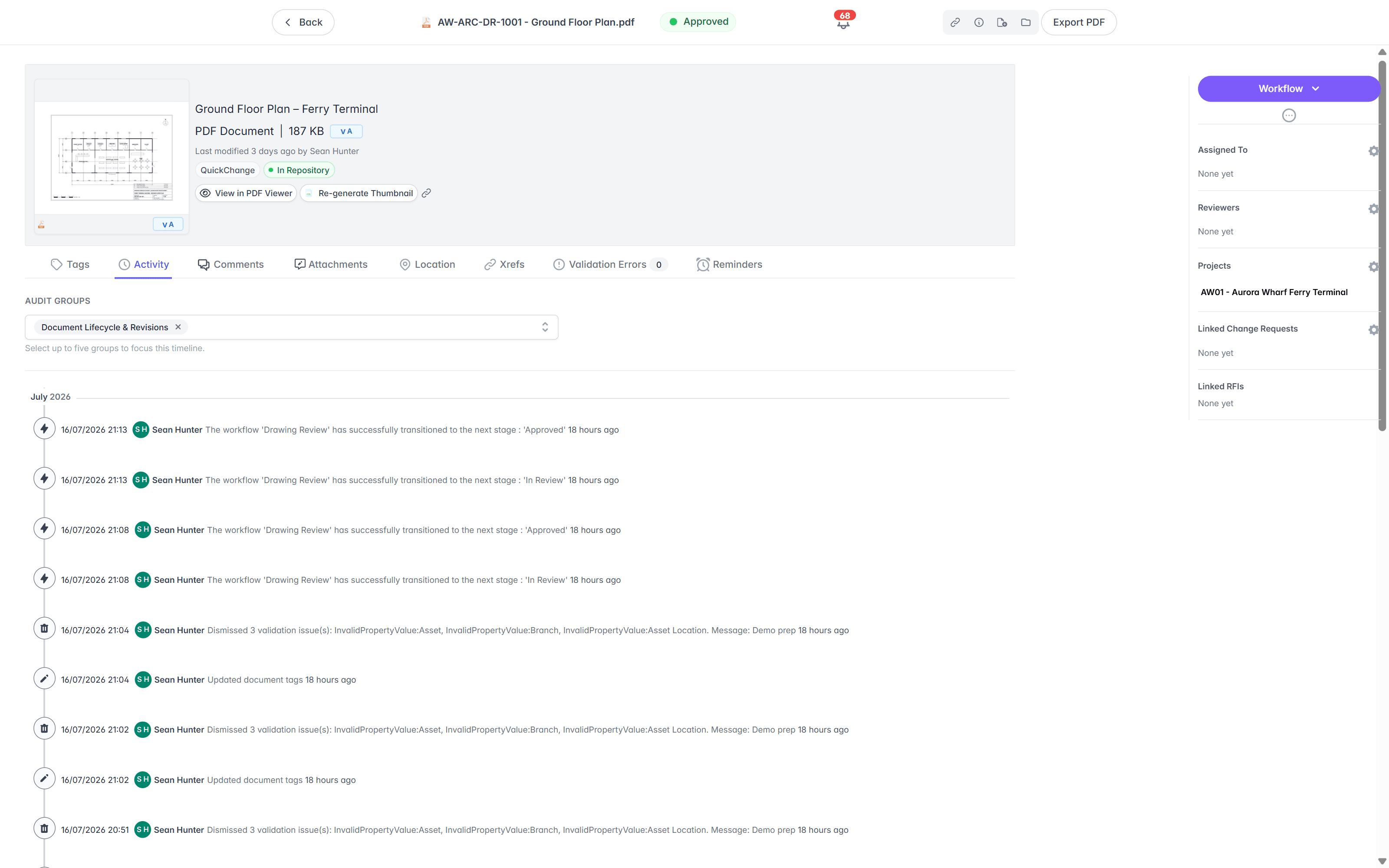
Run each document from draft to review to approved through a workflow you configure, with the reviewers and assignees your process already names. Raising a change locks the document to one editor. Every transition, tag change, and validation is written down against a person and a revision, so an approval is never a line in an email thread.
- Configurable review and approval workflows, with reviewers and assignees set per stage.
- A change locks the document to one editor, so two people cannot revise the same sheet at once.
- Each transition recorded against a named person, a revision, and a date.
- A full audit trail on every controlled document, filtered by lifecycle, revisions, or validation.
- Export the trail whenever an auditor asks for it.
configurable workflows · per-stage reviewers · edit locking · approval history · full audit trail · export for audit
Open the drawing without a CAD licence.
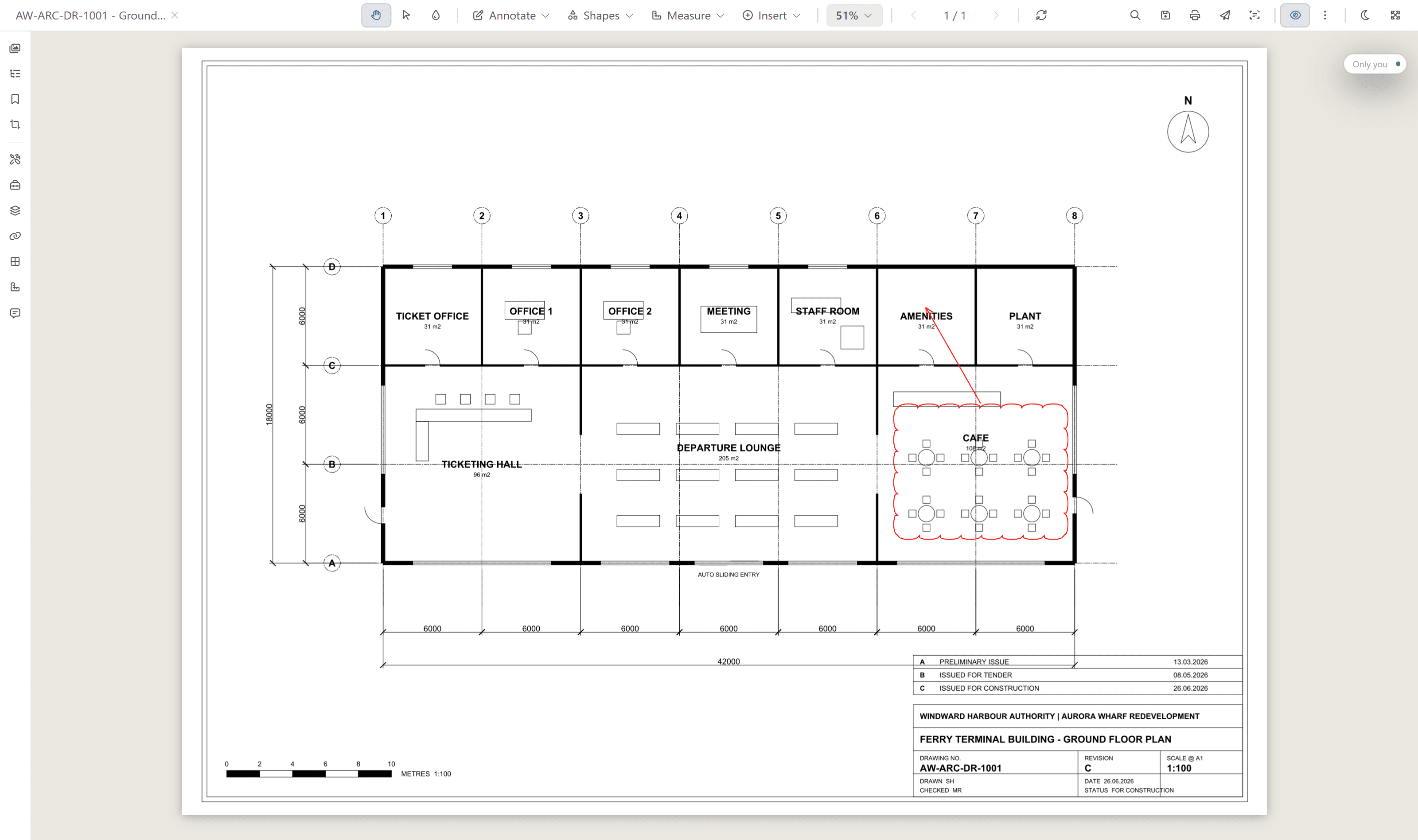
The whole team reads the controlled copy in the browser. Rift renders DWG, DGN, and PDF at full fidelity, with layers, measurement, and markup. Foundry opens IFC and RVT models, and Nimbus opens point clouds, all from the same document record.
- View DWG, DGN, RVT, PDF, and IFC in the browser, with no CAD licence and nothing to install.
- Toggle layers, measure, and mark up the sheet straight in the viewer.
- Open BIM models in Foundry and point clouds in Nimbus from the same record.
- Scan the QR in a printed title block to open the current revision on site, from the iPhone and Android apps.
rift · foundry · nimbus · layers · measurement · markup · no CAD licence
Find a document by the words printed inside it.
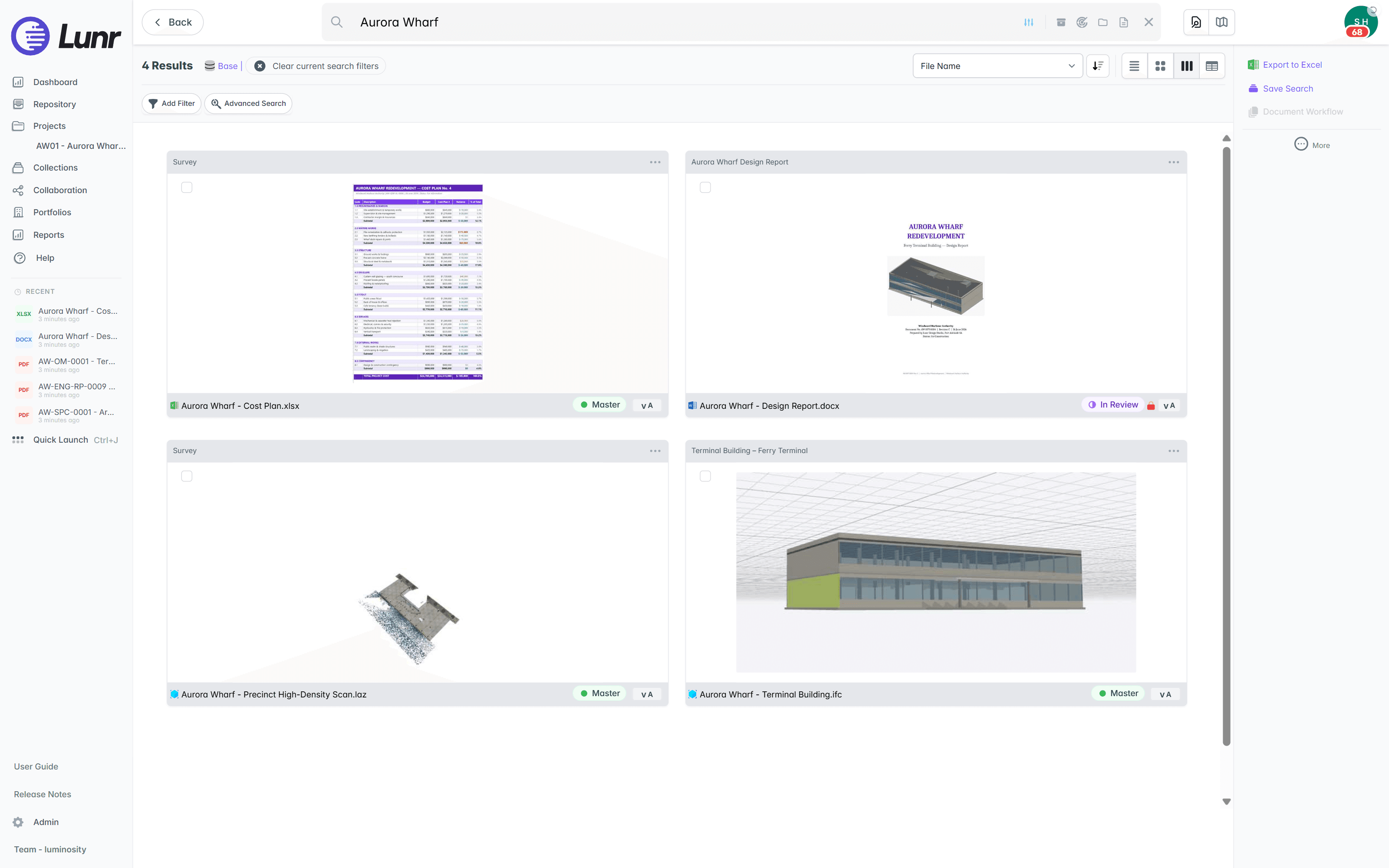
XRAY runs OCR and AI full-text search across every document on the register, so a search reaches inside a scanned PDF, a Word specification, an Excel schedule, and a CAD sheet alike. Search a document number, an asset tag, or a clause, and Lunr returns the controlled copy. Deep XRAY re-scans a dense drawing tile by tile, so a note in the corner is still found.
- OCR and AI full-text search across DWG, DGN, RVT, PDF, Word, Excel, and scanned images.
- Find a document by a number, a tag, or a phrase drawn inside it, rather than by its file name.
- Deep XRAY re-scans a dense sheet tile by tile, so no note on the drawing is missed.
- Filter by metadata, discipline, tags, and revision to narrow a register of tens of thousands.
OCR · AI full-text search · deep XRAY tile re-scan · metadata, discipline, and revision filters
Issue on a transmittal, and take handover complete.
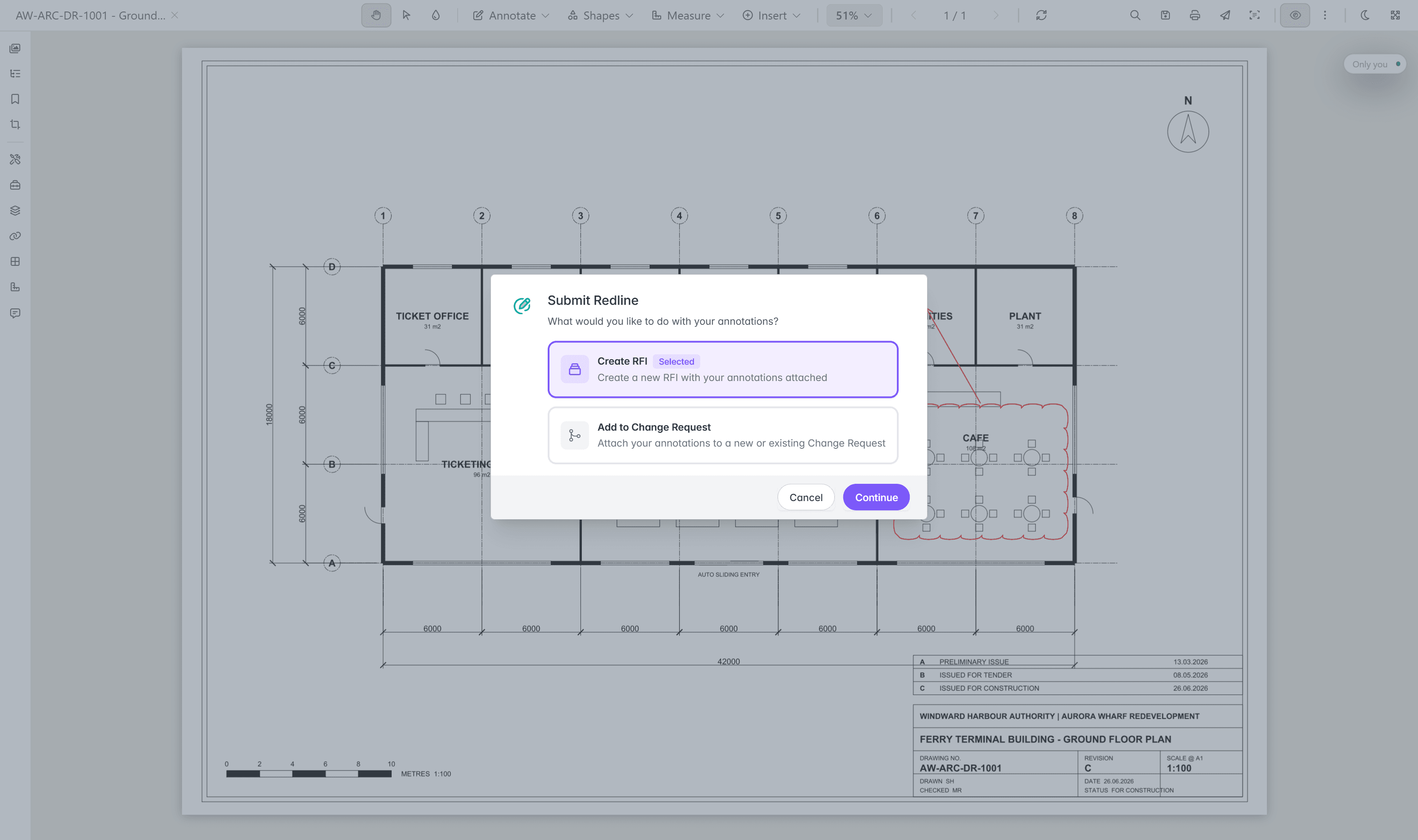
A controlled document leaves on a tracked transmittal that records what went out, to whom, and against which revision. Handover and submittal packages are validated against a manifest on upload, so a missing O&M manual or as-constructed drawing is caught at the door. A redline in the viewer becomes a change request or an RFI without anyone opening a CAD seat.
- Issue tracked transmittals, with a record of every document sent and received.
- Validate handover and submittal packages against a manifest, so a gap is caught on upload.
- Raise change requests and RFIs straight from a redline in the browser viewer.
- Bring external parties in as Collaborators, with access to what they need and nothing else.
tracked transmittals · manifest validation · change requests · RFIs · collaborator access
One record, connected to the systems around it.
Lunr holds the controlled record while your other systems run their own jobs. Read and write CAD through the connector APIs, tie documents to their place on the network in Esri GIS, and connect the facilities systems that run the estate. Every capability is included as standard.
Where a project requires a common data environment (CDE), Lunr runs one, with ISO 19650 information states and status codes through delivery and the same register carrying the record afterwards. The audit trail exports for a compliance audit at any time.
Read and write DWG and DGN through the connector APIs, so your CAD stays in step with the controlled record.
Tie documents to their place on the network, and open the controlled copy straight from the map.
Connect Archibus, MazeMap, and SISfm, so the systems that run the estate share one document record.
Sign staff in over SAML with your identity provider, and bring documents in from OneDrive.
Your instance runs in Australia or the US, operated by an ISO/IEC 27001:2022 certified hosting partner.
Take all metadata, documents, and models back out whenever you ask, so the record stays yours.
Trusted with the documents owners keep for decades.
Universities, utilities, energy companies, government asset owners, miners, and manufacturers run their engineering record on Lunr, through project delivery and on through the operating life of the asset.
documents under management on Lunr. Proof an EDMS holds up at owner-and-portfolio scale.
“Lunr is a simple solution that provides the flexibility to develop the system to our needs. Lunr is simple to use, and minimal training is required.”
By sector
Questions teams ask about engineering document management.
What an EDMS is, how it differs from a general document system, how to choose one, and what it takes to move your documents across.
- What is an engineering document management system (EDMS)?
- An engineering document management system is the controlled system an organisation keeps its engineering documents in. Each document is held as a record with a number from your scheme, a discipline, a current revision, a status, and the history of every change made to it, rather than as a file in a folder. It covers every format an engineering team produces, from DWG, DGN, RVT, and IFC to PDF, Word, and Excel, and it adds document numbering, revision control, review and approval workflows, controlled issue by transmittal, and a full audit trail. Lunr is an EDMS with more than 10 million documents under management.
- What is the difference between an EDMS and a document management system like SharePoint?
- A general document management system stores a file, versions it, routes it for approval, and controls who can open it. That is the right tool for a policy or a report. A drawing needs more. An engineering system identifies the document by its number rather than its file name, treats a revision as an issued state with an approver against it and the superseded copy kept, opens CAD formats in the browser with external references resolved, issues documents on tracked transmittals, and searches the text drawn on the sheet. Most owners run both, keeping Office collaboration where it is and moving the engineering record onto an EDMS. The University of Canberra moved more than 20,000 documents off SharePoint onto Lunr.
- How do you choose an engineering document management system?
- Test the shortlist on your own documents rather than on a demonstration set. Upload a dense scanned sheet and search for a tag printed on it. Open a DWG with external references and see whether they resolve. Supersede a revision and look at what happens to the earlier copy. Issue a transmittal to somebody outside the organisation and check what they can reach. Ask who holds the record when the project closes, where it is hosted, and how you get everything back out. The software survey walks the products asset owners shortlist against those questions.
- Which file formats does an engineering document management system handle?
- An EDMS has to hold every format an engineering team produces, not CAD alone. Lunr keeps DWG, DGN, RVT, PDF, and IFC under revision control alongside Word and Excel, and treats each one as a controlled document with a number, a discipline, and a current revision. Drawings and PDFs open in Rift, BIM models in Foundry, and point clouds in Nimbus, all in the browser, and XRAY searches the text inside every format, scans included.
- How do document numbering and revision control work?
- Lunr applies your numbering scheme as each document is booked in, and reads title-block and metadata tags off the document into the record, so nobody retypes the number, the discipline, or the revision. Every document then carries a full revision history. When a revision is superseded, the earlier copy stays on the record, numbered and marked, so no one mistakes it for the controlled version. Compare two revisions side by side, or overlay them to see what moved.
- How do approval workflows and audit trails work in an EDMS?
- Each document runs through a configurable workflow, from draft to review to approved, with reviewers and assignees set for every stage. Raising a change locks the document to one editor, so two people cannot revise the same sheet at once. Every transition is recorded against a named person and a revision, so an approval is never a line in an email thread. A full audit trail sits behind each controlled document, filtered by document lifecycle, revisions, or validation, and it exports for an ISO 19650 or compliance audit at any time.
- Does an EDMS work for projects as well as an operating record?
- Both, and the same register carries the document from one to the other. Through delivery, project spaces run the review and approval cycle, transmittals issue drawings to the parties who need them, and submittal packages are checked against a manifest on upload. Where a project requires a common data environment (CDE), Lunr runs one with ISO 19650 information states and status codes. At completion nothing has to be migrated, because the controlled set is already on the register the operations team reads from.
- Can you migrate documents from SharePoint or an existing system?
- Yes. Import documents in bulk, and Lunr reads title-block tags from each drawing and the metadata on each file into the record, so numbering and discipline are populated as documents arrive. Your numbering scheme applies automatically. An implementation runs through solution design workshops, a signed-off sandbox migration, and UAT before production cutover, with training and hypercare after it. Export all metadata, documents, and models whenever you need to, so the record stays yours.
- Where is an engineering document management system hosted, and how is it secured?
- Lunr is hosted in Australia and the US, operated by an ISO/IEC 27001:2022 certified hosting partner, and your instance sits in the region you require. Staff sign in over SAML with your identity provider, external parties join as Collaborators with access to what they need and nothing else, and every controlled document carries a full audit trail. More than 10 million documents are under management on Lunr today.
See it on your own documents.
Book a walkthrough with someone who knows what a transmittal, a controlled document, and an ISO 19650 audit trail are, and watch Lunr run against a set of your own.
10M+ documents under management · Hosted in Australia and the US · SAML · Full audit trail · Export anytime
- entity
- Lunr Labs Pty Ltd
- location
- Melbourne AU
- workspace
- documents.lunr.app
- rev
- 2026