An OpenText alternative built for the drawing record.
For the asset owners and engineering teams who keep the drawing record. Open any DWG, DGN, and RVT in the browser, search the text printed inside scanned sheets, and put a set under real revision control. Keep OpenText for enterprise content.
10M+ documents under management · Hosted in Australia and the US · SAML · Full audit trail
OpenText is serious software, for enterprise content.
OpenText runs enterprise records, contracts, and content governance at scale, and large organisations should keep it for that. The claim here is narrow. A general ECM was built for business documents first, and a drawing set needs things that sit outside the base platform.
Lunr is built for the drawing record. It holds the controlled set while OpenText keeps the enterprise content, so you add a register without running a platform migration.
Read why teams move CAD drawings off general systems- Enterprise records, contracts, and correspondence across the organisation.
- Compliance and retention for regulated business content at scale.
- Business processes wired into SAP and other line-of-business systems.
- Central content governance for a large enterprise with a dedicated ECM team.
Where a drawing record meets a general-purpose ECM.
These are the specific points where OpenText stops matching what an engineering drawing record needs. Each one is a job a drawing set requires and a general content platform handles only through added modules and configuration.
OpenText and Lunr, capability by capability.
A factual read of what each tool does for a drawing record. The two are not rivals for every row. OpenText holds the enterprise content, and Lunr holds the controlled drawing set.
| Capability | On OpenText | On Lunr |
|---|---|---|
| Manage enterprise business records and contracts | Yes, its core strength | Documents alongside the drawing record |
| Version an individual document | Yes, document version control | Yes, on every document |
| Drawing register showing the current revision of a set | Through the engineering configuration | Yes, a controlled register per set, built in |
| Open DWG, DGN, and RVT in the browser | Through the Brava add-on module | Yes, in the Rift and Foundry viewers, no CAD licence |
| Full-text search inside scanned drawings | Reads document text and metadata | Yes, XRAY OCR reads the text on the sheet |
| Title-block metadata read into fields | With extraction add-ons configured | Yes, parsed on import |
| Transmittals and handover validation | Through the engineering modules | Yes, tracked transmittals and manifest validation |
| Time to a working drawing record | Months to years, staged rollout | Weeks, on your own drawings |
A register over the set, not a version log on one document.
Book a drawing in and Lunr numbers it, keeps its full revision history, and marks the previous revision as superseded. The title-block fields come across as searchable metadata, so drawing number, revision, and discipline are things you filter on, not text buried in a document property.
- A controlled register per set, showing the current revision and status of every sheet at a glance.
- Automatic document and version numbering, applied in your register format as drawings are booked in.
- Superseded revisions kept and marked, never deleted and never mistaken for the current sheet.
- Title-block tags read into metadata, so the drawing number, revision, and discipline become filters.
controlled register · automatic numbering · superseded marking · title-block metadata
See document control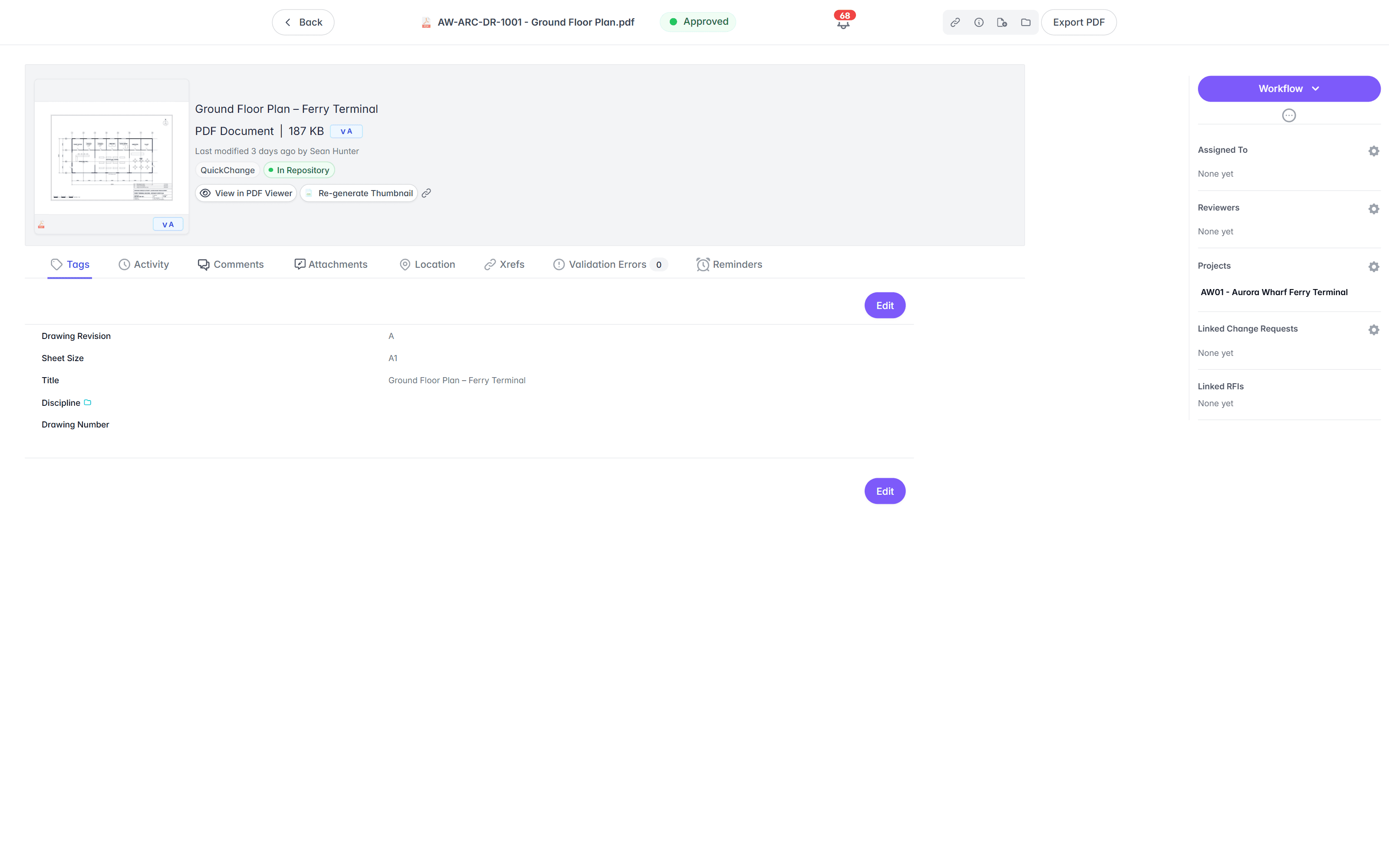
Open a DWG, DGN, or RVT in the browser, no add-on viewer.
On OpenText, opening a CAD drawing means the Brava viewer module, licensed on its own and installed for full function, so browser viewing is a separate rollout. In Lunr the Rift viewer renders DWG, DGN, and PDF at full fidelity, with layers, measurement, and markup, built into the record. Models open in Foundry, point clouds in Nimbus.
- View DWG, DGN, RVT, and PDF in the browser, with no CAD licence and nothing to install.
- Toggle layers, measure, and mark up the drawing straight in the viewer.
- Open BIM models in Foundry and point clouds in Nimbus from the same record.
- Turn a redline into a change request or an RFI without leaving the viewer.
browser viewers · layers · measurement · markup · no CAD licence
Try the viewers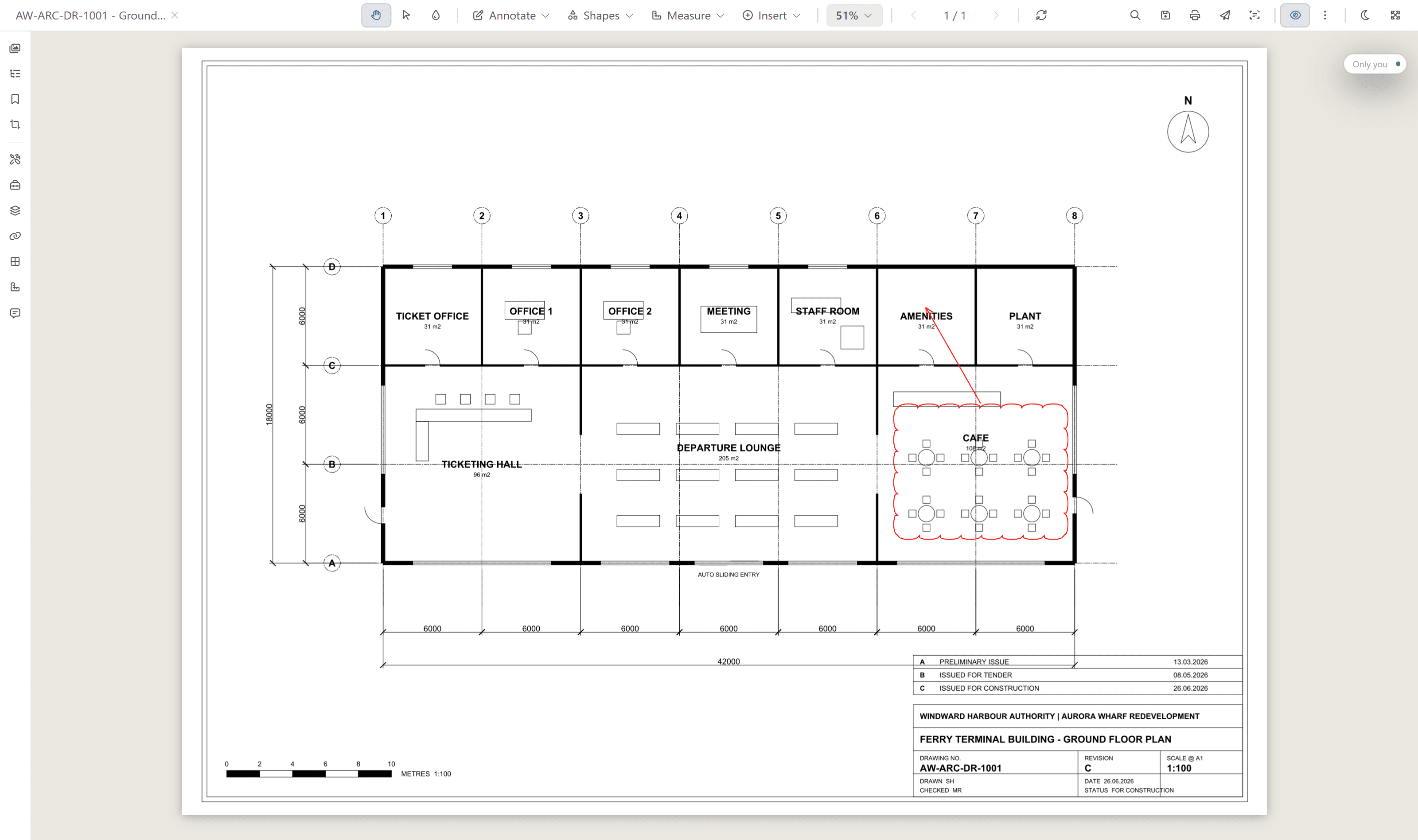
Search the words printed inside a scanned drawing.
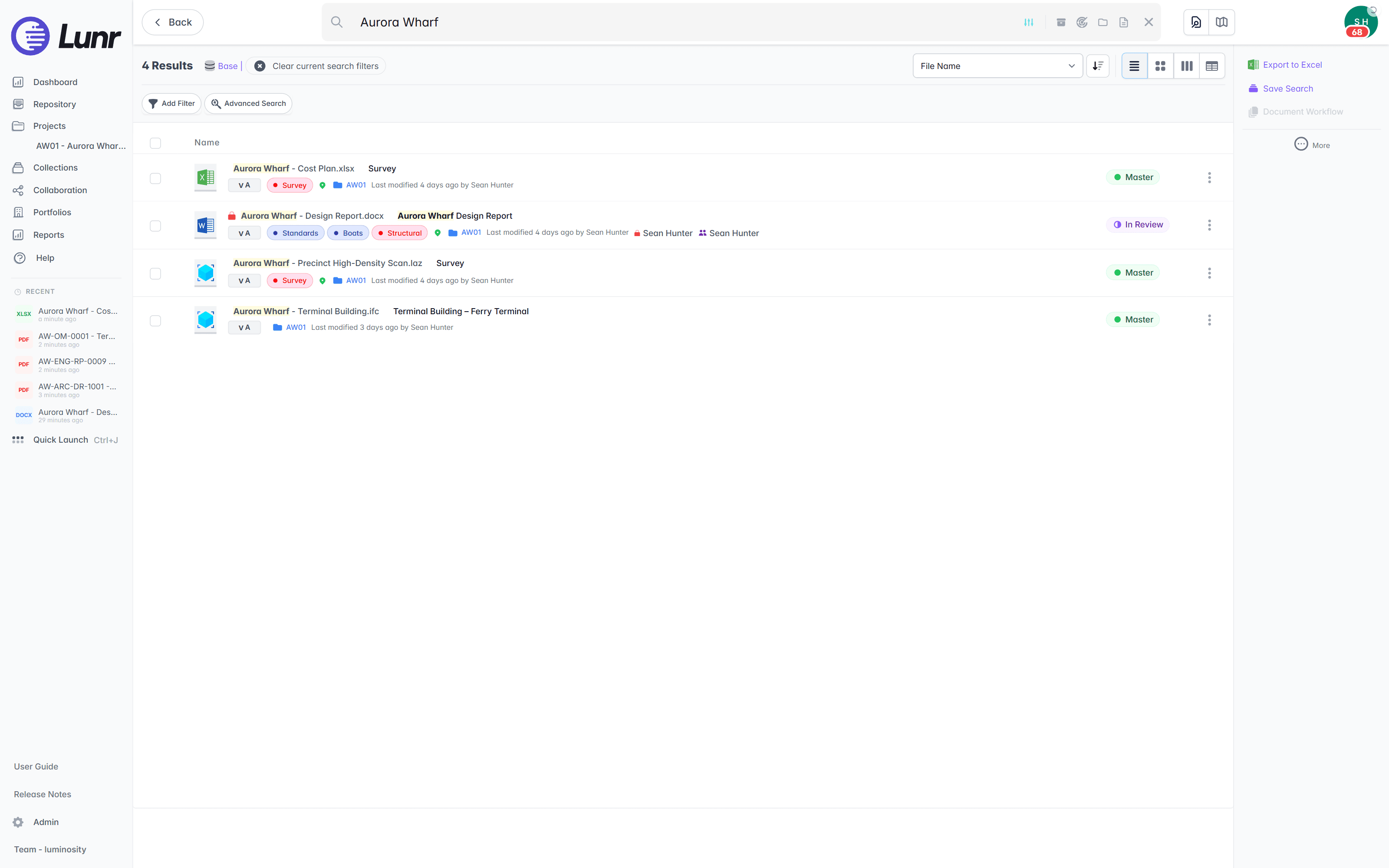
A general ECM index reads document text and metadata, so the content of a scanned drawing is invisible to it. XRAY runs OCR and full-text search across every drawing, scans included. Search a valve tag, a title-block reference, or a note, and Lunr returns the sheet whether it was saved this morning or scanned from a 1994 archive.
- OCR and AI full-text search across every DWG, DGN, RVT, PDF, and scanned image.
- Find a tag, a reference, or a note printed inside the drawing, not just the file name.
- Deep XRAY re-scans a dense sheet tile by tile, so nothing on the drawing is missed.
- Filter results by metadata, tags, and revision to narrow a large set fast.
OCR · AI full-text search · deep XRAY tile re-scan · metadata and tag filters
Issue drawings on the record, with an audit trail behind them.
Issuing a drawing set and validating a handover is engineering workflow, not something a general content platform ships to do. Lunr issues transmittals that track themselves, validates each handover package against a manifest so a missing as-constructed drawing is caught on upload, and keeps a full audit trail behind every approval, revision, and change.
- Issue tracked transmittals, and run change requests that hold, forward, and close.
- Validate each handover package against a manifest, and read title-block tags into metadata.
- Move drawings through configurable review and approval workflows.
- Keep a full audit trail on every controlled drawing, ready for compliance.
transmittals · manifest validation · change requests · configurable workflows · full audit trail
See handover and transmittals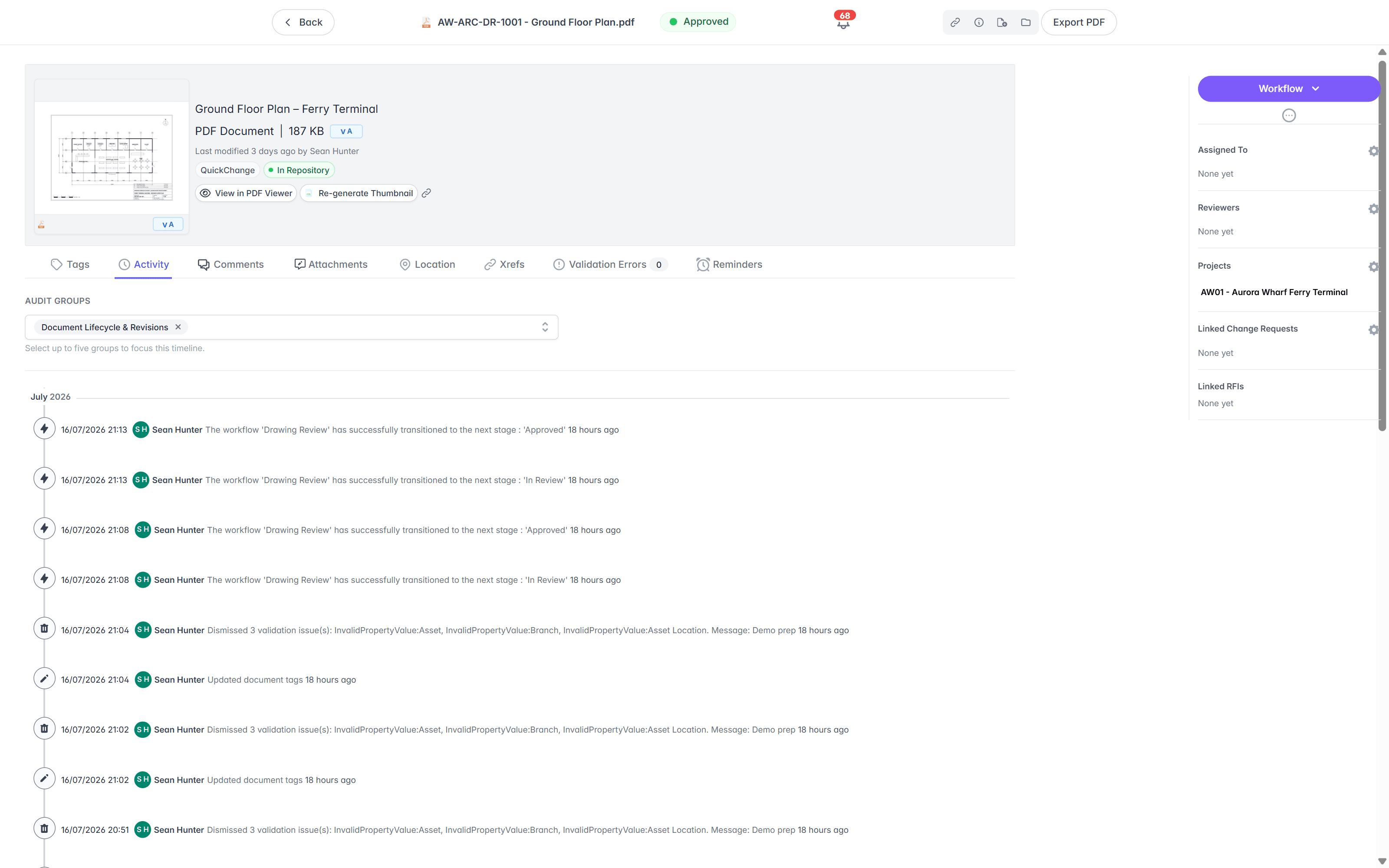
Move your drawings across, keep OpenText for the rest.
You do not have to run a platform migration or clear OpenText out. Import the drawings, keep the folders your team knows, and leave the enterprise content where it is. The drawing record moves to Lunr, and the business documents stay put.
- 01Import in bulk
Point Lunr at your OpenText export, and it reads the title-block tags from each sheet into metadata, so drawing number, revision, and discipline become fields you can filter on.
- 02Keep your folders
Your existing folder structure comes across, so people find drawings where they expect, while the register gives the controlled view on top.
- 03Keep OpenText for enterprise records
Run OpenText for contracts, correspondence, and the business processes wired into SAP, and Lunr for the drawing record, side by side. Nothing forces an all-or-nothing move.
- 04Stand it up in weeks
Lunr deploys on your own drawings in weeks, not the months-to-years programme a general ECM rollout usually takes, so the drawing record is working long before a platform migration would finish.
See the CAD, GIS, and facilities connectors on the connectors page.
Asset owners run the drawing record on Lunr.
Universities, utilities, energy companies, and government departments run their drawing record on Lunr, from project delivery through the operating life of the asset.
documents under management on Lunr. Proof the drawing record holds up at owner-and-portfolio scale.
“Lunr is a simple solution that provides the flexibility to develop the system to our needs. Lunr is simple to use, and minimal training is required.”
Questions teams ask about OpenText and engineering drawings.
What a general ECM can and cannot do for a drawing set, and what it takes to move the drawings onto Lunr while keeping OpenText for enterprise content.
- Is Lunr an OpenText alternative for engineering drawings?
- Yes. OpenText Content Server, Documentum, and Extended ECM are enterprise content management systems built for general business documents, with engineering handled as a separately licensed configuration on top. Lunr is built for the drawing record from the start. It opens CAD drawings in the browser, searches the text drawn inside a scanned sheet, and holds a drawing set under real revision control, without the weight of a general ECM. Asset owners who need the drawing record and little else run Lunr and keep OpenText for enterprise content.
- Does OpenText manage CAD drawings?
- It can. OpenText Content Management for Engineering, built on Extended ECM or Documentum, manages engineering drawings and documents across the asset lifecycle, and it integrates with AutoCAD, Revit, and MicroStation. The point to weigh is that this is a specialised, separately licensed layer on a general content platform, with the CAD viewer and title-block extraction as further add-ons. For an asset owner who needs a drawing record, that is a large platform to run for one job. Lunr does the same job as a purpose-built product.
- Can OpenText open CAD drawings in the browser?
- Through the Brava viewer, which is an optional add-on module. Brava supports over 100 formats including 2D and 3D CAD, and its Enterprise version serves a web viewer, while the Desktop version installs locally for full function. It is licensed and deployed on its own, on top of Content Server. In Lunr, the whole team opens DWG, DGN, RVT, and PDF in the browser through the Rift viewer with no CAD licence and nothing to install, and it is part of the record rather than a bolt-on.
- Can OpenText search the text inside a scanned drawing?
- A general ECM index reads document text and file metadata, not the words drawn inside a scanned sheet, so a valve tag or a note on an old scan is not something the search returns. Lunr runs XRAY, which does OCR and full-text search across every drawing, scans included. Search a tag, a title-block reference, or a note, and Lunr returns the sheet whether it was saved this morning or scanned from a 1994 archive.
- How does OpenText handle drawing revisions compared with Lunr?
- OpenText versions an individual document well, and its engineering configuration adds change management on top. What a drawing set needs is a register over the whole set: the current issue of every sheet, superseded copies kept and marked, and drawing number and revision read from the title block. Lunr builds those conventions in. Book a drawing in and Lunr numbers it in your register format, keeps its full revision history, and marks the previous revision as superseded, so the current sheet is never a guess.
- Can you keep OpenText alongside Lunr?
- Yes, and it is the sensible setup. Keep OpenText for enterprise records, contracts, and the business processes tied into SAP, and put the drawing record on Lunr. You add a controlled drawing register without ripping out your content platform, and each system keeps doing what it is good at.
- How long does it take to move drawings off OpenText?
- Import your drawings in bulk. Lunr reads the title-block tags from each sheet into metadata, so drawing number, revision, and discipline become searchable fields without retyping, and your existing folder structure comes across. Where an OpenText programme is measured in months to years, Lunr stands up the drawing record in weeks, because reading the title blocks removes most of the manual work and there is no platform to configure around it.
Eleven more systems, compared the same way.
Owners rarely weigh one system on its own. Each comparison below is written to the same shape: what the tool is built for, the specific points where an owner’s drawing record needs something else, and how the two sit side by side. Start with whichever one you already run.
Document library · Microsoft 365
SharePoint
Microsoft's document library and intranet, holding the Office documents the whole organisation works on.
Metadata-driven DMS · M-Files
M-Files
One governed document platform for the whole business, organised by metadata rather than by folder.
Project CDE · Oracle
Aconex
Oracle's project collaboration platform, carrying formal correspondence, transmittals, and submittals across the delivery team.
Project collaboration · InEight Document
TeamBinder
Delivery-side document control across the project team, sold today as InEight Document.
Construction management · Procore
Procore
Construction management built around the contractor running the build, from the field back to the office.
Construction cloud · Autodesk
Autodesk Docs
The common data environment inside Autodesk Construction Cloud, run for the project team.
Design collaboration · Bentley
ProjectWise
Bentley's work-sharing environment for design teams working on the same live files.
CAD data management · Autodesk
Autodesk Vault
CAD data management at the design desk, with check-in, check-out, and dependency tracking.
On-premise EDMS · Synergis
Synergis Adept
Engineering document management with task panes inside the CAD applications, built to run on servers you own.
AEC data management · 12d Solutions
12d Synergy
Australian AEC data management for the civil design office, reached through a Windows client.
Cloud EDMS · Accruent
RedEye
Cloud engineering document management for asset owners, sold today by Accruent alongside Meridian.
For the twelve set against each other in one place, start from the comparisons hub. For the wider field, including Accruent Meridian, and the six criteria to put to each vendor, read the survey of engineering document management software.
Keep OpenText. Give the drawings a home.
Book a walkthrough with someone who knows what a transmittal and an as-constructed drawing are, and watch Lunr run against a set of your own.
10M+ documents under management · Hosted in Australia and the US · SAML · Full audit trail · Export anytime
- entity
- Lunr Labs Pty Ltd
- location
- Melbourne AU
- workspace
- documents.lunr.app
- rev
- 2026