An Autodesk Vault alternative for the owner’s record.
For the asset owners and document controllers who hold the record once the drawing is issued. Put every DWG, DGN, RVT, and scanned sheet under revision control, search the words printed inside a 1994 scan, and open any drawing in a browser tab, with no Windows Server, no SQL Server, and no Windows client to deploy. Keep Vault where the CAD work happens.
10M+ documents under management · Hosted in Australia and the US · SAML · Full audit trail
Vault is product data management, and it is good at it.
Vault holds design data while the work is in progress. It puts add-ins inside Inventor, AutoCAD, Revit, and Civil 3D, keeps assembly and xref relationships intact when a file is renamed or moved, and runs items and engineering change orders in Vault Professional. A design office releasing CAD data, on Windows, from its own server room, is the case Vault was built around.
The claim here is narrow. It is about the record after the drawing is issued, and about who has to reach it: operations, facilities, contractors, and auditors, for the decades you run the asset.
Read why teams move CAD drawings to a controlled cloud record- Work-in-progress CAD data management, with Vault add-ins inside Inventor, AutoCAD, Revit, and Civil 3D.
- File relationships across an assembly, so renaming or moving a file repairs the parent drawings and xrefs pointing at it.
- Copy Design, which clones an assembly with its drawings and heals the references as it goes.
- Items, engineering change orders, and ERP integration in Vault Professional, for a team releasing product data.
Where an owner hits the edge of a CAD data management server.
Each point below is drawn from Autodesk’s own published system requirements, help documentation, and support articles, so your IT department can check every one of them. Together they describe what an owner carries to make the drawing record reachable.
Vault and Lunr, capability by capability.
A factual read of what each system does across the life of a drawing. The two are not rivals on every row. Vault holds the advantage while the drawing is being designed. Lunr holds it once the drawing is issued and the rest of the organisation needs to read, search, and control the record.
| Capability | On Autodesk Vault | On Lunr |
|---|---|---|
| CAD data management at the designer's desk | Add-ins inside Inventor, AutoCAD, Revit, and Civil 3D | Not an authoring add-in; issued drawings arrive by connector, upload, or transmittal |
| Repairing references when a CAD file is renamed or moved | Yes, Vault updates the parent files and xrefs | Validates each incoming package and reports missing xrefs at handover |
| Where the record sits | Your Windows Server, or your own Azure or AWS deployment | Hosted in Australia or the US, in the region you require |
| Servers needed to run the record | Windows Server with Microsoft SQL Server | None, the record runs in the browser |
| Workstation requirements to check a drawing in | Windows 10 or 11 Professional or Enterprise | A browser, on any operating system |
| Working in the browser | Thin Client, read-only | Viewing, markup, workflow, and search, all in the browser |
| What a person is allowed to do | Set by Vault Professional or Vault Office entitlement | Every capability standard, for everyone you grant access |
| Full-text search inside scanned drawings | Content indexing is off by default and reads text in known file types | XRAY reads every sheet, and Deep XRAY re-scans a dense drawing tile by tile |
| Word and Excel files | Stored and versioned as files in the vault | Opened natively in Rift Word and Rift Excel, with no Office licence |
| 3D models and point clouds | Inventor and other supported models in the browser viewer | Models in Foundry, point clouds in Nimbus |
| A controlled register across the whole estate | Vaults organised around design projects and product data | One register over every building, plant, and network you hold |
| Getting a new release | You plan, test, and apply each upgrade | Applied continuously, nothing for your team to schedule |
Vault rows describe Vault Basic and Vault Professional as published by Autodesk. Vault Workgroup was discontinued, and Vault Workgroup 2023 is its last release.
Open a DWG, DGN, or RVT in a browser tab, on any machine.
In Vault, taking part means the Windows client, because the browser Thin Client is read-only. In Lunr the Rift viewer renders DWG, DGN, and PDF at full fidelity, with layers, measurement, and markup, in the browser. Models open in Foundry, point clouds in Nimbus, on a laptop, a tablet, or a phone in the field.
- View DWG, DGN, RVT, and PDF in the browser, with no CAD licence and nothing to install.
- Toggle layers, measure to the drawing's own scale, and mark up with a revision cloud.
- Work on macOS, Windows, a tablet, or a phone, without a supported-client list to police.
- Give operations, facilities, and contractors access without a client deployment.
browser viewers · layers · measurement · markup · no client install
Try the viewers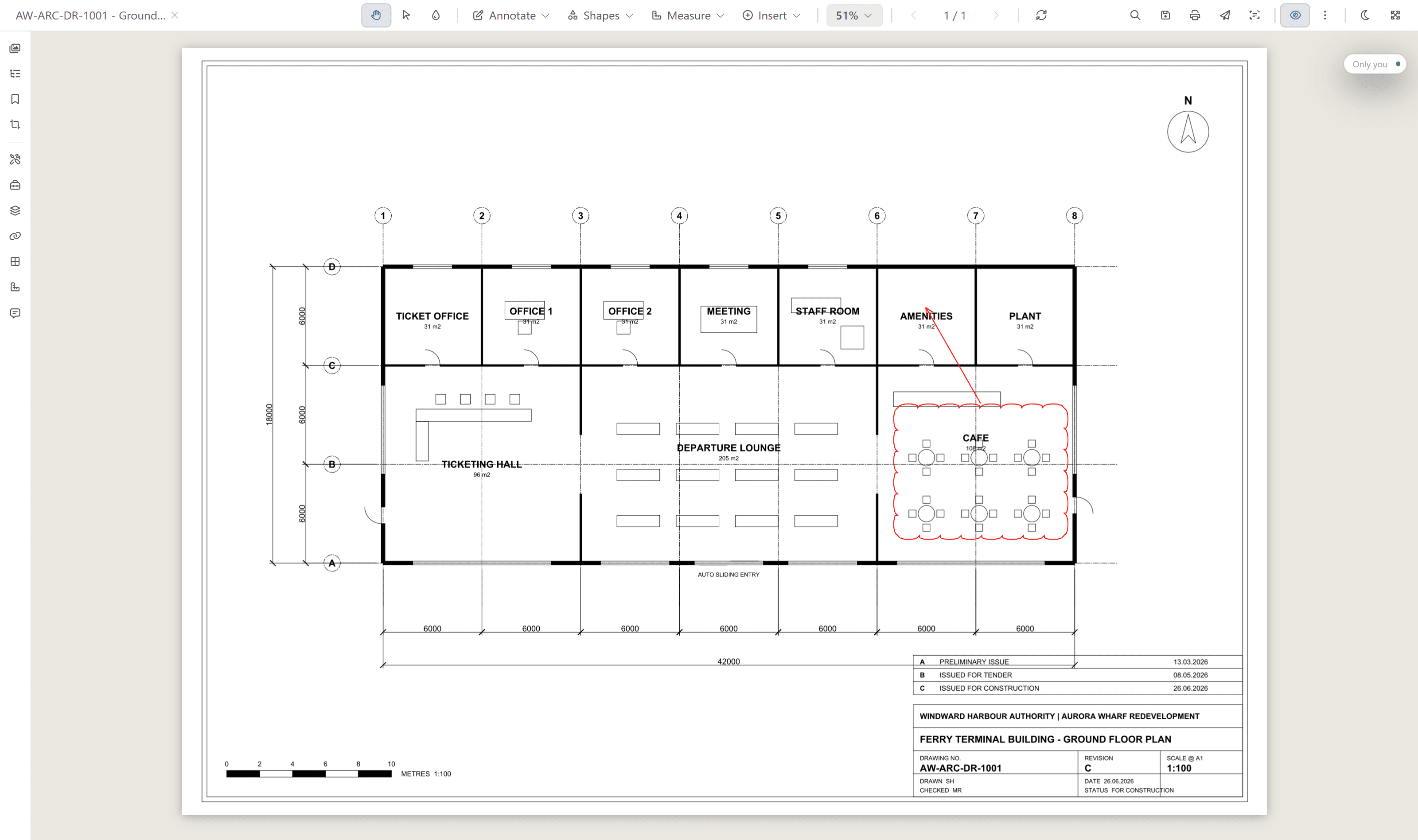
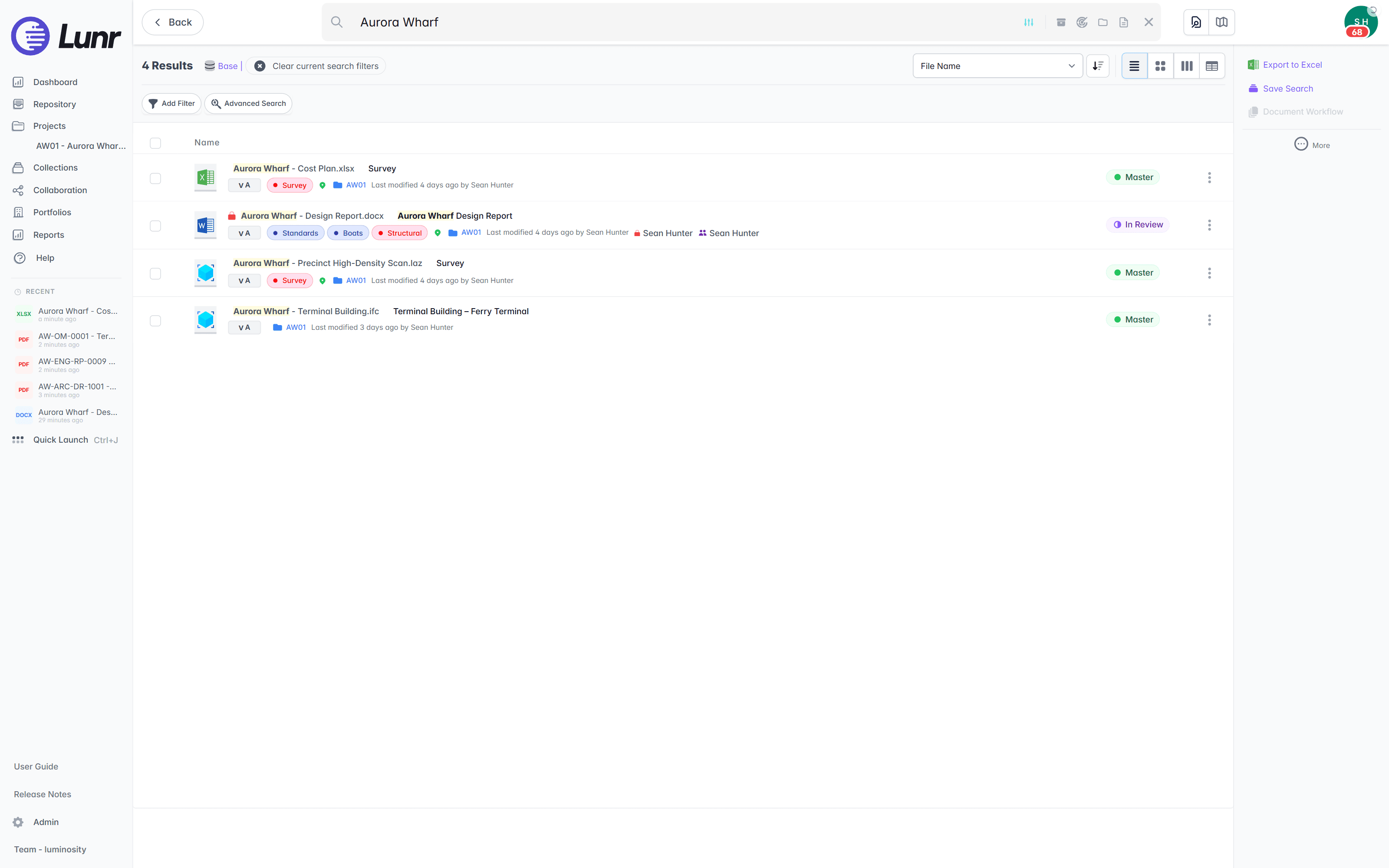
Search the words printed inside a scanned drawing.
An owner inherits decades of scanned sheets. Autodesk’s documentation states that by default, textual content is not indexed in a vault, and that a full content search then finds a text string within a known file type, which leaves an image of a drawing with nothing to read. XRAY runs OCR and AI full-text search across everything you store, so a valve tag from a 1994 scan turns up as fast as a file you saved this morning. For a dense drawing, Deep XRAY re-reads the sheet in high-resolution tiles, so faint or crowded text still resolves.
- OCR and AI full-text search across every DWG, DGN, RVT, PDF, and scanned image.
- Find a tag, a reference, or a note printed inside the drawing, not just the file name.
- Deep XRAY re-scans a dense sheet tile by tile, so nothing on the drawing is missed.
- Filter by tag and metadata, or find geo-tagged drawings on a map with polygon search.
OCR · AI full-text search · deep XRAY tile re-scan · tag and map filters
Take handover on the record, and catch the missing reference.
Vault keeps references intact inside the design office. The owner’s risk arrives with the package: a set booked in with an xref or a raster underlay left behind, which nobody notices until someone opens the drawing for maintenance years later. Lunr interrogates each incoming change request, validates the package against its manifest, and reports missing external references before the drawings become the record.
- Validate each incoming package against its manifest, so a missing as-constructed is caught on delivery.
- Report missing external references on upload, before the drawings are booked in.
- Issue tracked transmittals out, and run change requests that hold, forward, and close.
- Keep a full audit trail behind every approval, revision, and change on the controlled record.
manifest validation · missing xref detection · transmittals · full audit trail
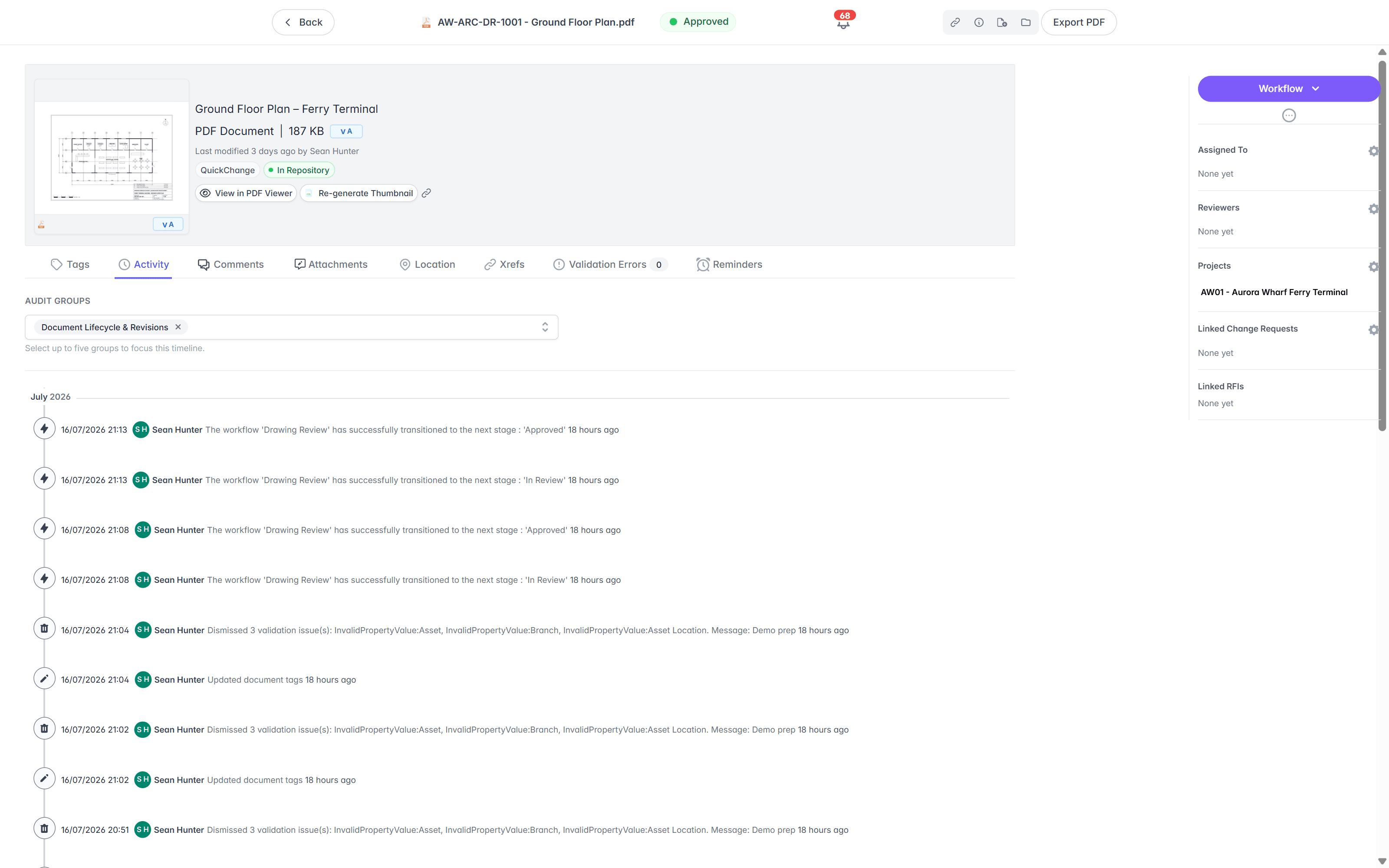
One register across the estate, configured by your own team.
Vault organises data around the design project and the product being released. An owner’s register runs across every building, plant, and network held, for the whole operating life. Book a drawing in and Lunr numbers it, keeps its full revision history, and marks the previous revision as superseded, with title-block fields carried across as searchable metadata.
- A controlled register across every asset, showing the current revision and status of each sheet.
- Automatic document and version numbering, applied in your register format as drawings are booked in.
- Configurable review and approval workflows, with tag-based permissions your team sets.
- Superseded revisions kept and marked, so the current sheet is never in doubt.
estate register · automatic numbering · configurable workflows · superseded marking
See document control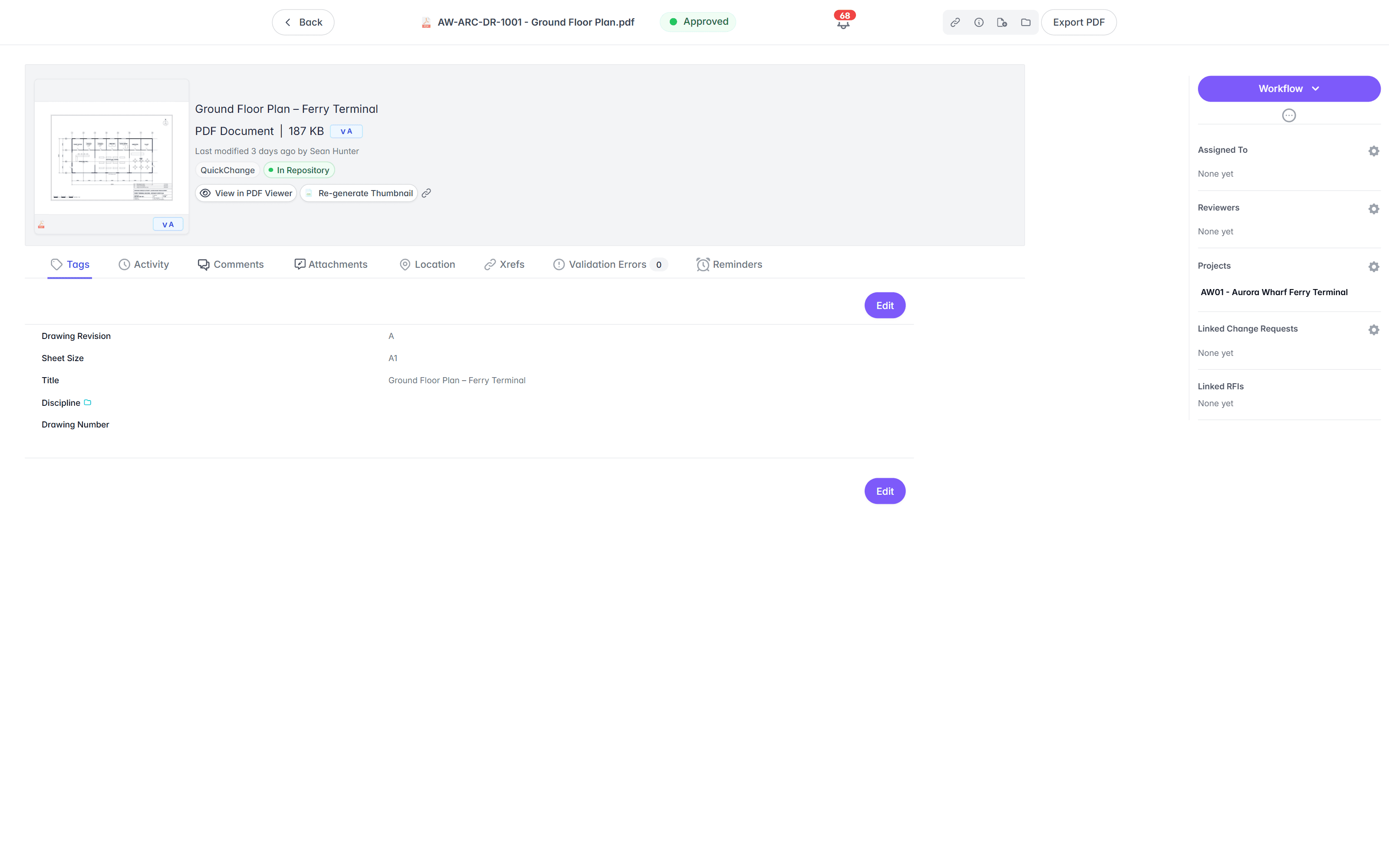
Move the record first, retire the servers after.
Nothing is ripped out on day one. Design the mapping, run a full sandbox migration you sign off, test it with your own document controllers, then cut over on your date. Vault keeps running until the record is proven in Lunr, and the Windows and SQL estate retires after cut over instead of before it.
- 01Design the mapping
Solution design workshops settle the numbering, the metadata, and the asset hierarchy, and map every Vault property to its destination in Lunr. Nothing moves before the mapping is signed off.
- 02Run a sandbox migration
The team extracts from Vault and loads a full migration into a sandbox, so you see your own documents, your own metadata, and your own revision history. Reconciliation counts prove every source document is accounted for, and the mappings are corrected and rerun until you sign them off.
- 03Test it with your own controllers
The signed-off configuration moves to a test environment, where your document controllers run acceptance testing on real migrated data: workflows, access control, search, transmittals, and viewing. Anything they raise is fixed and retested.
- 04Cut over, then decide about the server
The production migration runs to an agreed cutover with a final delta pass, so late changes come across. Most organisations keep Vault read-only for a period afterwards, then retire the Windows and SQL estate once the record is proven in Lunr.
Export all metadata, drawings, and models at any time, so the record is never locked to us. Read how a migration runs on the implementation page, and see the CAD, GIS, and facilities integrations on the connectors page.
Owners already run their record on Lunr.
Universities, utilities, energy companies, and government departments run their drawing record on Lunr, from project delivery through the operating life of the asset. The team has migrated organisations off Autodesk Vault, ProjectWise, SharePoint, OnBase, DataViewer, and Meridian.
documents under management on Lunr. Proof the drawing record holds up at owner-and-portfolio scale.
“Lunr is a simple solution that provides the flexibility to develop the system to our needs. Lunr is simple to use, and minimal training is required.”
Questions owners ask about Lunr and Autodesk Vault.
What Vault is built for, what an owner carries to keep it running, and what it takes to hold the issued record without interrupting the design office.
- Can Autodesk Vault serve as an asset owner's document control system?
- Vault is product data management for a design team, and it is strong at that job. It holds work in progress, keeps assembly and xref relationships intact when files are renamed or moved, and runs items and engineering change orders in Vault Professional. An owner's document control system has a different shape. It holds the issued record across every building, plant, and network for decades, stays readable by operations, facilities, contractors, and auditors who never open a CAD application, and carries scanned drawings from long before anyone ran Vault. Owners generally keep Vault where the design work happens and hold the controlled record on a system built for the operating life of the asset.
- What is the difference between Lunr and Autodesk Vault?
- The difference is where the record lives, who keeps it running, and who can reach it. Vault is a client-server application: the Autodesk Data Management Server and a Microsoft SQL Server database on Windows Server, patched and upgraded by your team, with a Windows client on each workstation and a read-only Thin Client in the browser. Autodesk does not sell Vault as a hosted service, so running it on Azure or AWS is still your own deployment. Lunr is hosted in Australia or the US and reached through a browser, so drawings, models, and Office files open on any operating system with nothing installed. Vault holds the advantage at the CAD desk. Lunr holds it across the rest of the organisation.
- Can Autodesk Vault search the text inside a scanned drawing?
- Not on its own. Autodesk's documentation states that by default, textual content is not indexed, and that once the Content Indexing Service is enabled, a full content search finds a text string within a known file type. That covers files already carrying text, and it comes with the caveat that a multi-site vault returns only files at the local site. A scanned sheet is an image, so there is nothing for the index to read. Lunr runs OCR and AI full-text search across everything you store, so a valve tag on a 1994 scan turns up as fast as a file saved this morning, and Deep XRAY re-reads a dense drawing in high-resolution tiles so faint or crowded text still resolves.
- How does moving off Autodesk Vault work, and does the revision history come across?
- The team has migrated organisations off Autodesk Vault before, and the shape is the same every time. Solution design workshops settle the numbering, the metadata, and the asset hierarchy, and map every Vault property to its destination in Lunr. A full sandbox migration then loads your own documents, metadata, and revision history, with reconciliation counts against the source, and it reruns until you sign it off. Revision history comes across in full: every earlier revision is loaded and marked as superseded, so you inherit the history rather than a snapshot of migration day. The production cutover finishes with a delta pass, and Vault keeps running read-only for as long as you want the fallback.
Eleven more systems, compared the same way.
Owners rarely weigh one system on its own. Each comparison below is written to the same shape: what the tool is built for, the specific points where an owner’s drawing record needs something else, and how the two sit side by side. Start with whichever one you already run.
Design collaboration · Bentley
ProjectWise
Bentley's work-sharing environment for design teams working on the same live files.
On-premise EDMS · Synergis
Synergis Adept
Engineering document management with task panes inside the CAD applications, built to run on servers you own.
AEC data management · 12d Solutions
12d Synergy
Australian AEC data management for the civil design office, reached through a Windows client.
Document library · Microsoft 365
SharePoint
Microsoft's document library and intranet, holding the Office documents the whole organisation works on.
Enterprise content · OpenText
OpenText
Enterprise content management covering every document class a business holds, engineering among them.
Metadata-driven DMS · M-Files
M-Files
One governed document platform for the whole business, organised by metadata rather than by folder.
Project CDE · Oracle
Aconex
Oracle's project collaboration platform, carrying formal correspondence, transmittals, and submittals across the delivery team.
Project collaboration · InEight Document
TeamBinder
Delivery-side document control across the project team, sold today as InEight Document.
Construction management · Procore
Procore
Construction management built around the contractor running the build, from the field back to the office.
Construction cloud · Autodesk
Autodesk Docs
The common data environment inside Autodesk Construction Cloud, run for the project team.
Cloud EDMS · Accruent
RedEye
Cloud engineering document management for asset owners, sold today by Accruent alongside Meridian.
For the twelve set against each other in one place, start from the comparisons hub. For the wider field, including Accruent Meridian, and the six criteria to put to each vendor, read the survey of engineering document management software.
Keep Vault at the CAD desk. Move the record to the browser.
Book a walkthrough with someone who knows what a transmittal and an as-constructed drawing are, and watch Lunr run against a set of your own.
10M+ documents under management · Hosted in Australia and the US · SAML · Full audit trail · Export anytime
- entity
- Lunr Labs Pty Ltd
- location
- Melbourne AU
- workspace
- documents.lunr.app
- rev
- 2026