A RedEye alternative for engineering drawing management.
For the asset owners and document controllers weighing two cloud systems built for the same job. RedEye is capable software with deep roots in Australian utilities and energy, now sold by Accruent alongside Meridian. Lunr is an independent Australian product built around the owner’s controlled register, with browser viewing, revision control, and search inside every scanned sheet.
10M+ documents under management · Hosted in Australia and the US · SAML · Full audit trail
RedEye is good software, with a real record behind it.
RedEye was founded in Brisbane in 2012, and Accruent announced its acquisition in January 2024. Accruent publishes case studies with Snowy Hydro, Urban Utilities, Aurora Energy, SA Power Networks, and Brown University, and states that industry leaders across more than 75 countries use the product. The Snowy Hydro deployment covers roughly 115,000 asset artefacts across sixteen power stations. That is serious work in the same market Lunr serves.
The claim here is narrow. Both products hold the engineering record in the cloud for an asset owner. This page sets out what differs, and leaves the rest to a trial on your own drawings.
Read why owners move the drawing record to the cloud- Field access from a phone, with iOS and Android apps and offline access for crews working away from the network.
- Retrieval by metadata, GIS, OCR, or QR code, including QR codes printed onto tender and construction documentation.
- Native CAD viewing without a CAD licence, across 2D CAD, 3D CAD and BIM, Office, Visio, and legacy formats.
- Revision control and audit trails behind role-based permissions, with data held onshore in an ISO 27001 compliant environment.
Six questions to put to both products.
Two credible products separate on detail, not on feature lists. Each answer below states what each vendor publishes, so your document control team can check it. On several of these the honest answer is parity, and the page says so.
Accruent publishes native CAD access with no CAD licence, across 2D CAD, 3D CAD and BIM, Office, Visio, and legacy formats. In Lunr, Rift renders DWG, DGN, and PDF with layers, measurement, and markup, Foundry opens BIM models, and Nimbus opens point clouds, so a laser scan of a plant room sits in the same register as the drawings of it.
Accruent publishes OCR-based search alongside metadata, GIS, and QR code retrieval. Lunr runs XRAY, which pairs OCR with AI full-text search across DWG, DGN, RVT, PDF, and scanned images, and Deep XRAY re-reads a dense sheet in high-resolution tiles. Test both on the worst microfilm scan you hold, not on a clean drawing.
Accruent's engineering document management portfolio holds Meridian and RedEye, published as design, review, and approval on one side and operations and the field on the other, with an integration carrying approved documents between them. Lunr is one product and one register. Ask which shape suits an estate your size.
Lunr validates each handover package against a manifest as it lands, so a missing as-constructed drawing or O&M manual is caught on upload rather than found years into operation. Ask any vendor on your shortlist to run that check on a real package of your own.
Accruent states that RedEye holds data onshore on AWS in an ISO 27001 compliant environment, and it added regionally hosted environments for EMEA and LATAM in August 2025. Lunr is hosted and operated by an ISO/IEC 27001:2022 certified partner in Australia and the US, in the region you require. Both answer the sovereignty question, so ask where implementation and support sit as well.
Accruent publishes REST API connectivity and integration with CMMS platforms including Maintenance Connection. Lunr connects to Esri, Archibus, MazeMap, SISfm, and OneDrive, and exports all metadata, drawings, and models at any time. Ask each vendor to name the systems already connected in your industry, and to name a reference running that connection today.
The same questions, with six more, run across the whole field in the survey of engineering document management software.
RedEye and Lunr, capability by capability.
A factual read of what each product does for an asset owner. Many rows come out level, because the two were built for the same reader. The rows that differ are the ones worth a demo.
| Capability | On RedEye, an Accruent product | On Lunr |
|---|---|---|
| Cloud engineering document management for asset owners | Yes, its core purpose | Yes, the same job |
| One controlled register held by the owner | Yes, a single source of truth for engineering files | Yes, one register across every project and decade |
| Revision control with an audit trail | Yes, behind role-based permissions | Yes, with superseded revisions kept and marked |
| Native CAD viewing without a CAD licence | Yes, 2D CAD, 3D CAD and BIM, Office, Visio, and legacy formats | Yes, DWG, DGN, RVT, and PDF in Rift, with layers and measurement |
| Point clouds in the same record | Not named in Accruent's published materials | Yes, in Nimbus |
| Search inside a scanned drawing | Yes, OCR-based search | Yes, XRAY OCR and AI full-text search, with Deep XRAY tile re-scan |
| Finding a drawing by location | Yes, GIS integration | Yes, map-based discovery with polygon search and Esri GeoJSON layers |
| Opening the current revision from a printed sheet | Yes, QR code retrieval | Yes, scan the QR in a printed title block |
| Field access away from a desk | Yes, iOS and Android apps with offline access | Yes, iOS and Android apps with offline collections |
| Review and approval workflows | Yes, automated document reviews and approvals | Yes, configurable review and approval workflows |
| Handover packages validated against a manifest | Not named in Accruent's published materials | Yes, checked on upload so a missing sheet is caught |
| Transmittals, change requests, and RFIs from the register | Document markup and sharing | Yes, tracked transmittals, change requests, and RFIs |
| Where the record is hosted | Onshore on AWS, with EMEA and LATAM regions added in 2025 | Australia or the US, in the region you require |
| Who builds and supports the product | Accruent, a Fortive company, alongside Meridian | Lunr Labs in Australia, one product |
RedEye rows describe the product as published by Accruent on its RedEye pages, press releases, and case studies. Where a capability is absent from those materials the row says so, rather than treating silence as an answer.
Revision control on the drawing, not version history on a file.
Lunr numbers each record in your register format, keeps the full revision history, and marks the previous revision as superseded, so the current sheet is never a guess years into operation. Title-block fields come across as searchable metadata, so drawing number, revision, and discipline are things you filter on rather than read off a plot.
- A controlled register showing the current revision and status of every sheet at a glance.
- Automatic document and version numbering, applied in your register format as drawings are taken on.
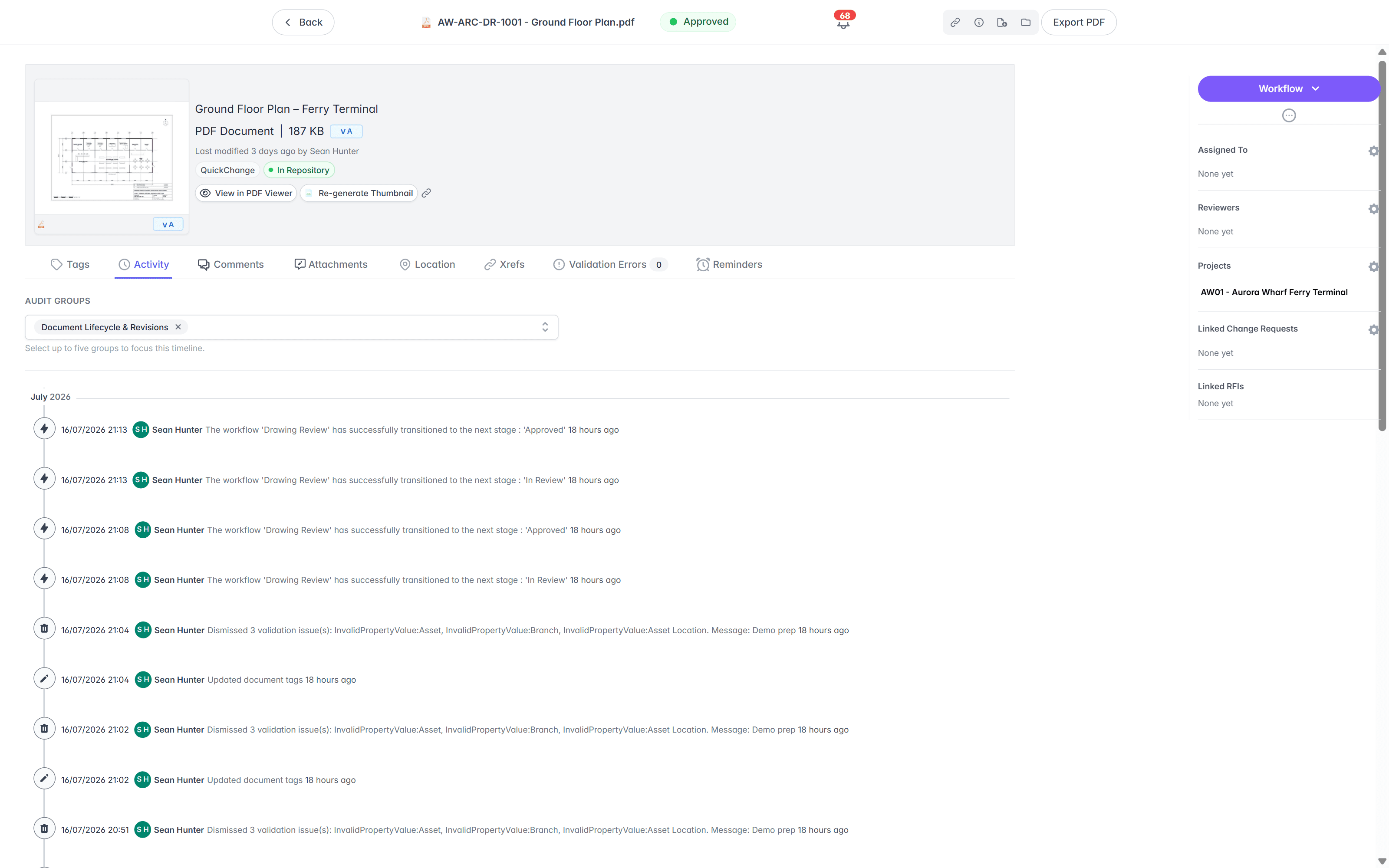
- Superseded revisions kept and marked, with every approval tied to a named person and a revision.
- One register across every project and every decade, rather than a separate record per project.
owner’s register · automatic numbering · superseded marking · title-block metadata
See document control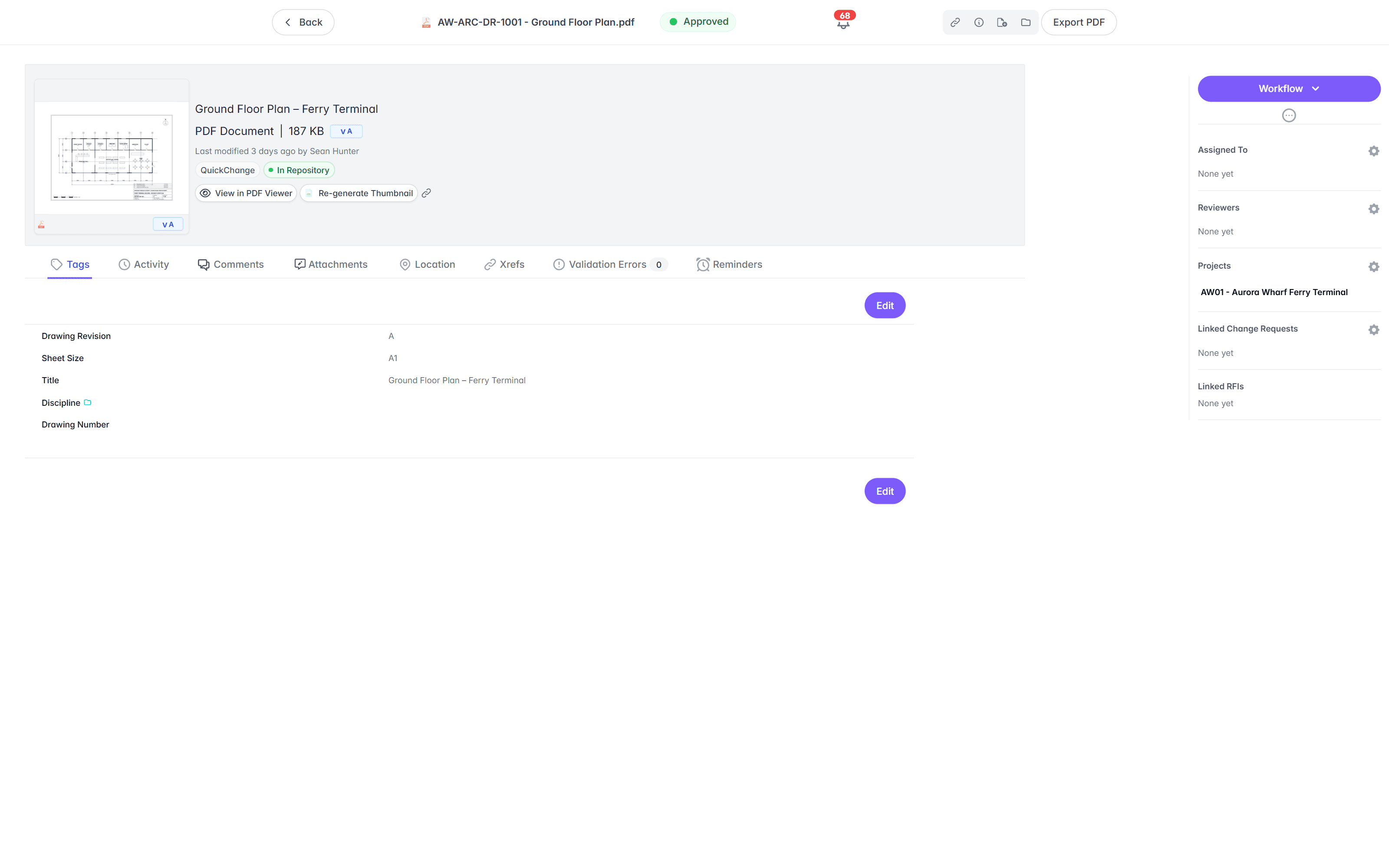
Three viewers: drawings, models, and point clouds.
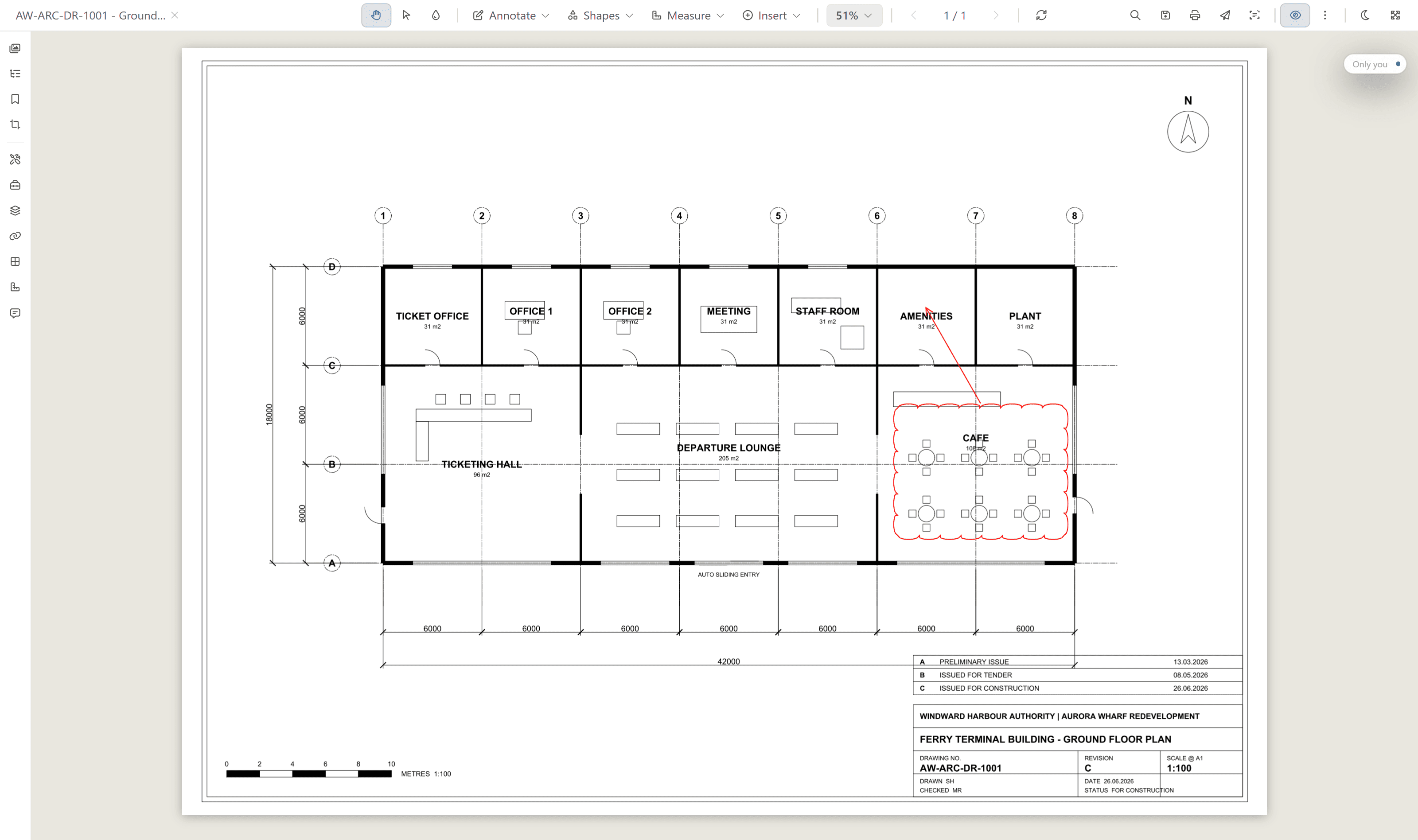
Both products open native CAD without a CAD licence, and that is the floor rather than the difference. In Lunr the Rift viewer renders DWG, DGN, and PDF at full fidelity with layers, measurement, and markup, Foundry opens IFC and BIM models, and Nimbus opens point clouds, so a scan of a plant room sits beside the drawings of the same asset in one register.
- View DWG, DGN, RVT, and PDF in the browser, with no CAD licence and nothing to install.
- Toggle layers, measure to the drawing's own scale, and mark up with a revision cloud.
- Open BIM models in Foundry and point clouds in Nimbus from the same record.
- Turn a redline into a change request or an RFI without leaving the viewer.
browser viewers · layers · measurement · markup · no CAD licence
Search the words printed inside a scanned drawing.
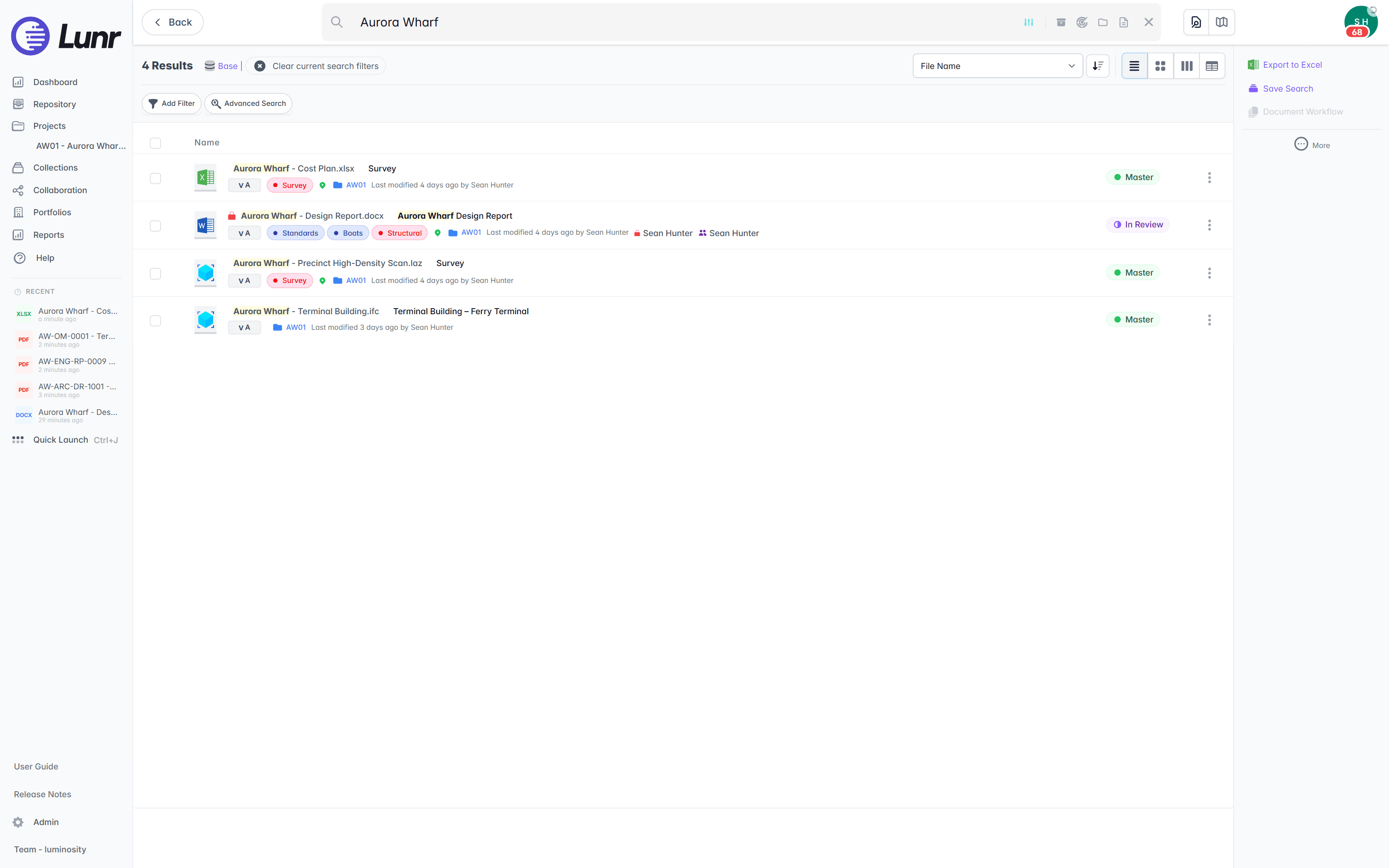
An owner inherits decades of sheets, and much of the archive is scanned from paper or microfilm. XRAY pairs OCR with AI full-text search across every DWG, DGN, RVT, PDF, and scanned image you hold, so a valve tag on a 1994 sheet turns up as fast as a file saved this morning, and Deep XRAY re-reads a dense drawing in high-resolution tiles when the first pass is not enough.
- OCR and AI full-text search across every DWG, DGN, RVT, PDF, and scanned image.
- Find a tag, a reference, or a note printed inside the drawing, not just the file name.
- Deep XRAY re-scans a dense sheet tile by tile, so nothing on the drawing is missed.
- Filter by tag and metadata, or draw a polygon on the map and pull back every document inside it.
OCR · AI full-text search · deep XRAY tile re-scan · tag and map filters
Catch a missing as-constructed drawing on the day it arrives.
Lunr validates each handover package against a manifest as it lands, so a missing as-constructed drawing or O&M manual is caught on upload rather than found years into operation. It issues transmittals from the register, moves operational revisions through configurable review and approval, and keeps a full audit trail behind every approval, revision, and change.
- Validate each handover package against a manifest, and read title-block tags into metadata.
- Issue tracked transmittals from the register, and run change requests that hold, forward, and close.
- Move operational revisions through configurable review and approval workflows your team sets.
- Keep a full audit trail on every controlled drawing, ready for compliance and audit.
manifest validation · transmittals · change requests · configurable workflows · full audit trail
Move the register without retyping it.
Changing systems is the part owners dread, so treat it as four steps rather than a project. Export what you hold, import it in bulk, bring the legacy archive alongside, and open the register for operations. Lunr reads the title blocks so the metadata arrives with the drawings.
- 01Export the register you hold today
Take the drawings, the metadata, and the revision history out of your current system. Ask for the native files rather than plots, so the record arrives as DWG, DGN, RVT, and PDF rather than as flattened images.
- 02Import in bulk, and read the title blocks
Point Lunr at the set and it reads the title-block tags from each sheet into metadata, so drawing number, revision, and discipline become fields you filter on rather than text you retype.
- 03Bring the legacy archive alongside
Load the decades of older sheets that never made it into any system, scans included, and run XRAY across the lot, so a 1994 drawing and this year's as-constructed sit in one register.
- 04Open the register for operations
The controlled set becomes a live register your team runs, where new revisions land through the operating life of the asset, and the next project hands its close-out set to the same place.
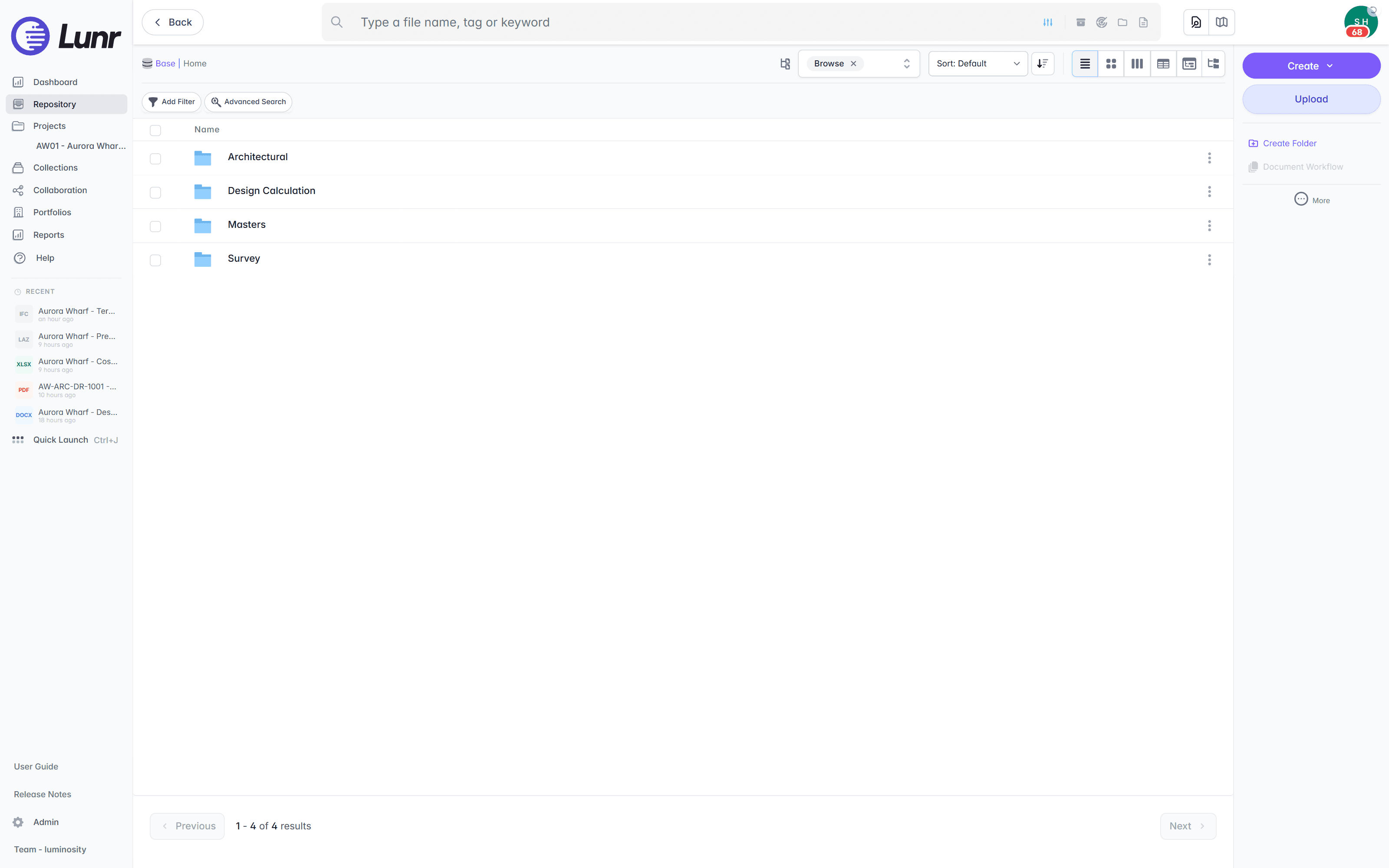
Export all metadata, drawings, and models at any time, so the record is never locked to us. Lunr connects to Esri, Archibus, MazeMap, SISfm, and OneDrive; see the connectors page for what keeps the register fed.
Owners already run the record this way.
Universities, utilities, energy companies, and government departments run their drawing record on Lunr, taking it at handover and keeping it live through the operating life of the asset.
documents under management on Lunr. Proof the owner’s record holds up at owner-and-portfolio scale.
“Lunr is a simple solution that provides the flexibility to develop the system to our needs. Lunr is simple to use, and minimal training is required.”
Questions owners ask when they shortlist both.
What RedEye is called now, how Meridian and RedEye divide the lifecycle, which formats open in each, where the data sits, and what it takes to move a register across.
- Is Lunr a RedEye alternative?
- Yes, and it is the closest like-for-like comparison on this site. Both are cloud engineering document management systems built for asset owners rather than for a project that closes, both put the drawing record in a browser, and both are used by utilities, energy companies, and universities. The two differ on the shape of the product line, on what opens in the viewer, on how search reads a scanned sheet, and on what happens when a handover package lands short. Shortlist both and run them against your own drawings.
- Is RedEye still RedEye, or is it Accruent now?
- Both name the same product. RedEye was founded in Brisbane in 2012, and Accruent announced its acquisition in January 2024. RedEye is now sold as part of Accruent's engineering document management portfolio alongside Meridian, and the redeye.co address redirects to the RedEye product page on accruent.com. Accruent is headquartered in Austin, Texas and is a Fortive company. Australian buyers searching for RedEye and buyers reading an Accruent proposal are looking at one platform.
- RedEye or Lunr, which is better for cloud collaboration and version control?
- On the core of it the two are close, and any answer that claims otherwise is selling. Both hold one controlled register in the cloud, keep a full revision history behind role-based permissions, carry an audit trail, and open native CAD without a CAD licence. The differences sit at the edges. RedEye's published strengths are mobile-first field access with offline working, and retrieval by GIS or QR code. Lunr's are XRAY, which pairs OCR with AI full-text search and re-reads a dense sheet tile by tile in Deep XRAY, three viewers covering drawings, BIM models, and point clouds, and handover packages validated against a manifest on upload. Settle it by loading your worst microfilm scan and a real close-out package into both.
- What is the difference between Accruent Meridian and RedEye, and where does Lunr sit?
- Accruent publishes the two as a pair across the asset lifecycle. Meridian covers design, review, and approval with deep CAD integration, RedEye covers operations and the field with cloud access for crews and contractors, and an integration moves approved documents from Meridian into RedEye at handover. Lunr is one product holding one register. The controlled set lands at handover and the same register keeps taking revisions through operation, so the record does not change systems partway through the life of the asset. Which shape is right depends on how your design and operations sides are organised, so it is worth putting to both vendors directly.
- Can Lunr open the same file formats as RedEye?
- Accruent publishes native CAD access with no CAD licence across 2D CAD, 3D CAD and BIM, Office, Visio, and legacy formats. Lunr covers the same ground through three viewers. Rift renders DWG, DGN, and PDF at full fidelity with layers, measurement, and markup, and opens Word and Excel natively. Foundry opens IFC and BIM models. Nimbus opens point clouds, which matters once an owner starts scanning plant rooms and tunnels, because the scan then sits in the same register as the drawings of the same asset. Bring a difficult file to both demos rather than comparing format lists.
- We are an Australian owner. Where is our data held?
- Both products answer the sovereignty question. Accruent states that RedEye stores data onshore on AWS in an ISO 27001 compliant environment, and in August 2025 it added regionally hosted environments for EMEA and LATAM. Lunr is hosted and operated by an ISO/IEC 27001:2022 certified partner in Australia and the US, your instance sits in the region you choose at setup, and your data stays in-region. Since both clear the bar, take the question further: ask which entity signs the contract, where implementation and support staff sit, and how quickly you can get a person who knows your register on the phone.
- How does moving a drawing register from RedEye into Lunr work?
- Export the drawings, metadata, and revision history you hold, then import the set into Lunr in bulk. Lunr reads the title-block tags from each sheet into metadata, so drawing number, revision, and discipline become searchable fields without retyping, and automatic numbering applies your register format as records land. Ask for native files rather than plots so the set arrives as DWG, DGN, RVT, and PDF. Load the legacy archive in the same pass, run XRAY across everything, and the register is live. Lunr exports all metadata, drawings, and models at any time, so the record is never locked to us either.
- Do field crews need an app, or does the browser do it?
- Either. Lunr runs in a browser on any device, so a facilities officer can open a sheet without installing anything, and there are iOS and Android apps for the field. Scan the QR in a printed title block to open the current revision, download a collection of documents for offline access before heading somewhere without coverage, read RFIs and change requests, and move a document through its workflow from where you stand. RedEye publishes iOS and Android apps with offline access too, so this row is close to parity; the question worth asking is which app your crews will actually open.
Eleven more systems, compared the same way.
Owners rarely weigh one system on its own. Each comparison below is written to the same shape: what the tool is built for, the specific points where an owner’s drawing record needs something else, and how the two sit side by side. Start with whichever one you already run.
Document library · Microsoft 365
SharePoint
Microsoft's document library and intranet, holding the Office documents the whole organisation works on.
Enterprise content · OpenText
OpenText
Enterprise content management covering every document class a business holds, engineering among them.
Metadata-driven DMS · M-Files
M-Files
One governed document platform for the whole business, organised by metadata rather than by folder.
Project CDE · Oracle
Aconex
Oracle's project collaboration platform, carrying formal correspondence, transmittals, and submittals across the delivery team.
Project collaboration · InEight Document
TeamBinder
Delivery-side document control across the project team, sold today as InEight Document.
Construction management · Procore
Procore
Construction management built around the contractor running the build, from the field back to the office.
Construction cloud · Autodesk
Autodesk Docs
The common data environment inside Autodesk Construction Cloud, run for the project team.
Design collaboration · Bentley
ProjectWise
Bentley's work-sharing environment for design teams working on the same live files.
CAD data management · Autodesk
Autodesk Vault
CAD data management at the design desk, with check-in, check-out, and dependency tracking.
On-premise EDMS · Synergis
Synergis Adept
Engineering document management with task panes inside the CAD applications, built to run on servers you own.
AEC data management · 12d Solutions
12d Synergy
Australian AEC data management for the civil design office, reached through a Windows client.
For the twelve set against each other in one place, start from the comparisons hub. For the wider field, including Accruent Meridian, and the six criteria to put to each vendor, read the survey of engineering document management software.
Put both in front of your own drawings.
Book a walkthrough with someone who knows what a transmittal and an as-constructed drawing are, and watch Lunr run against a register of your own.
10M+ documents under management · Hosted in Australia and the US · SAML · Full audit trail · Export anytime
- entity
- Lunr Labs Pty Ltd
- location
- Melbourne AU
- workspace
- documents.lunr.app
- rev
- 2026