A Bentley ProjectWise alternative built for asset owners.
For the owners and document controllers who hold the record once the design is issued. Put every DGN, DWG, and RVT under revision control, search the text printed inside scanned sheets, and open any drawing in the browser. Let the design firm keep ProjectWise for work in progress.
10M+ documents under management · Hosted in Australia and the US · SAML · Full audit trail
ProjectWise is strong software, for the job it was built for.
ProjectWise runs design work in progress well, coordinating a delivery team across model-centric MicroStation and DGN workflows, and plenty of engineering firms should keep it for that. The claim here is narrow. ProjectWise is design infrastructure for the project, and an asset owner needs something different once drawings are issued.
Lunr is built for the owner’s record. It holds the controlled set in the browser while the design firm keeps ProjectWise for work in progress, so you add a record without taking anything away from delivery.
Read why teams move CAD drawings to a controlled cloud record- Live design work in progress, coordinated across a delivery team mid-project.
- Model-centric MicroStation, OpenRoads, and OpenBuildings workflows.
- Managed workspaces that keep DGN configuration consistent across the design office.
- Design and constructability reviews while the engineering is still moving.
Where an owner hits the edge of design-WIP infrastructure.
These are the specific points where ProjectWise stops matching what an asset owner needs from the record. Each one is a consequence of software built to run a design project, put to work holding an owner’s controlled set.
ProjectWise and Lunr, capability by capability.
A factual read of what each tool does across the life of a drawing. The two are not rivals for every row. ProjectWise runs the design while the project is live, and Lunr holds the owner’s controlled record once it is issued.
| Capability | On ProjectWise | On Lunr |
|---|---|---|
| Design work-in-progress collaboration for the delivery team | Yes, its core strength | Not the focus; Lunr holds the issued record |
| Model-centric MicroStation and DGN workflows | Yes, deep Bentley heritage | Opens DGN in the browser, without a MicroStation workspace |
| Runs without a desktop client or managed workspace | ProjectWise Explorer client and managed workspaces | Browser based, nothing to install |
| Owner-side access for operations and facilities | Per-seat, licensed around the design team | Wide access for the whole team, no CAD licence |
| Open DGN, DWG, and RVT in the browser | Yes, through ProjectWise 365 and Bentley viewers | Yes, in the Rift and Foundry viewers, no CAD licence |
| Full-text search inside scanned legacy drawings | Indexes attributes and documents | Yes, XRAY OCR reads the text on the sheet |
| A controlled record for the operating life of the asset | Scoped to project delivery | Yes, a record that outlives the project |
| Administration overhead to run it | Datasources, managed workspaces, an administrator | Configured for owners, minimal administration |
A register the owner holds, not a workspace the project runs.
Book a drawing in and Lunr numbers it, keeps its full revision history, and marks the previous revision as superseded. The title-block fields come across as searchable metadata, so drawing number, revision, and discipline are things you filter on, without a managed workspace to configure or an administrator to run it.
- A controlled register per set, showing the current revision and status of every sheet at a glance.
- Automatic document and version numbering, applied in your register format as drawings are booked in.
- Superseded revisions kept and marked, never deleted and never mistaken for the current sheet.
- Title-block tags read into metadata, so the drawing number, revision, and discipline become filters.
controlled register · automatic numbering · superseded marking · title-block metadata
See document control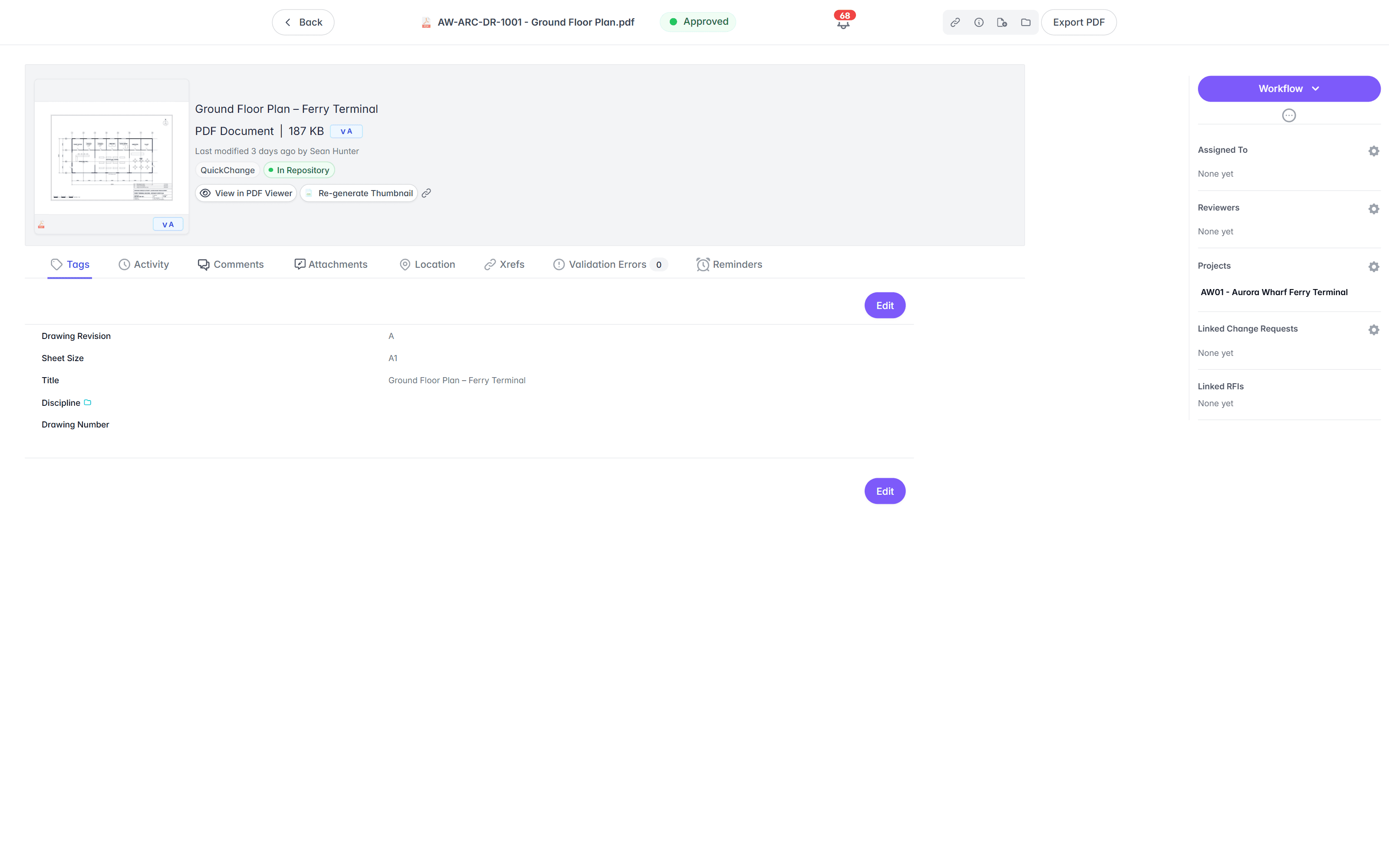
Open a DGN, DWG, or RVT in the browser, no client to install.
With ProjectWise, access leans on the ProjectWise Explorer client and a licensed seat, so wide owner-side viewing is a deployment in its own right. In Lunr the Rift viewer renders DGN, DWG, and PDF at full fidelity, with layers, measurement, and markup, all in the browser. Models open in Foundry, point clouds in Nimbus.
- View DGN, DWG, RVT, and PDF in the browser, with no CAD licence and nothing to install.
- Toggle layers, measure, and mark up the drawing straight in the viewer.
- Open BIM models in Foundry and point clouds in Nimbus from the same record.
- Give operations, facilities, and contractors access without a client deployment.
browser viewers · layers · measurement · markup · no client install
Try the viewers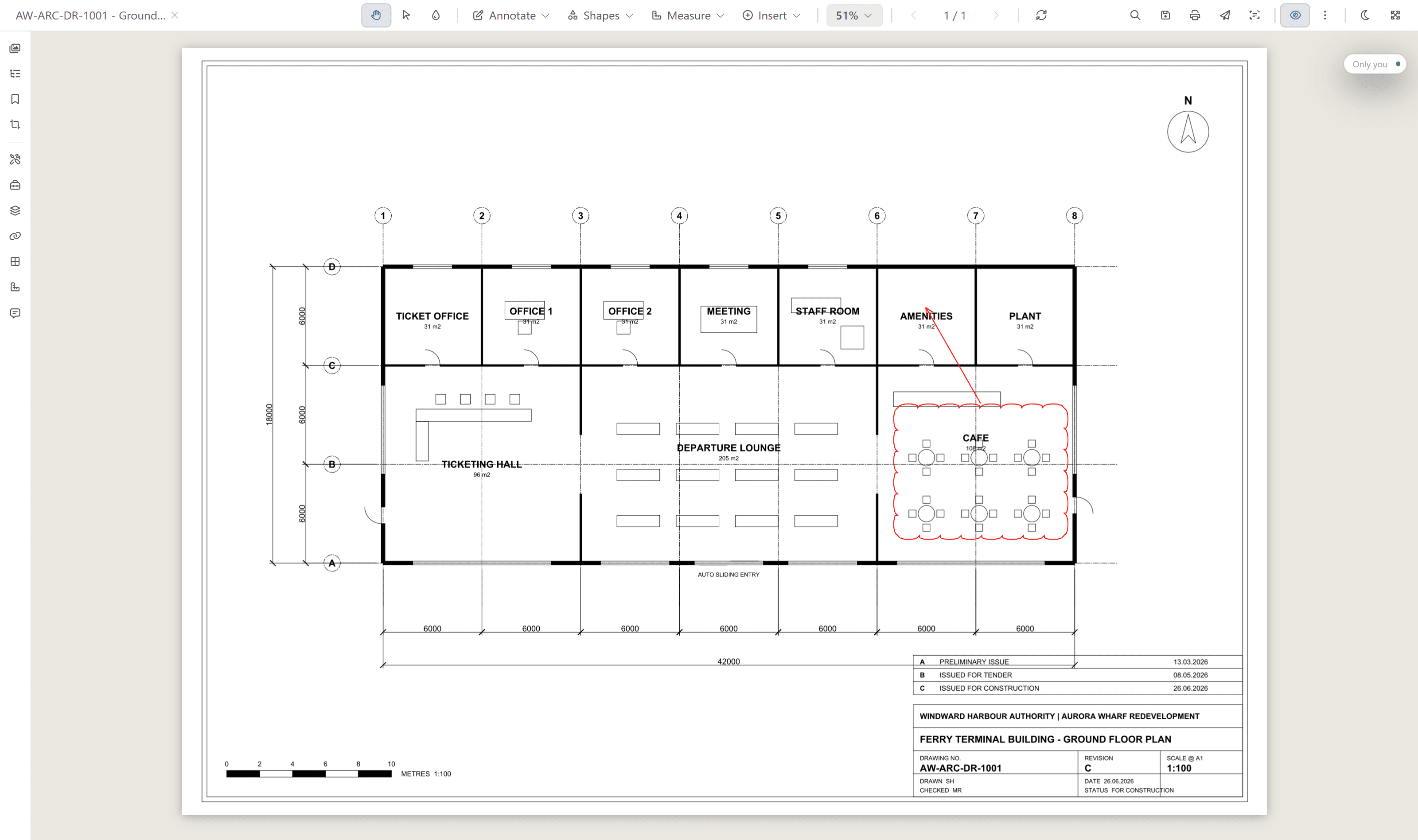
Search the words printed inside a scanned drawing.
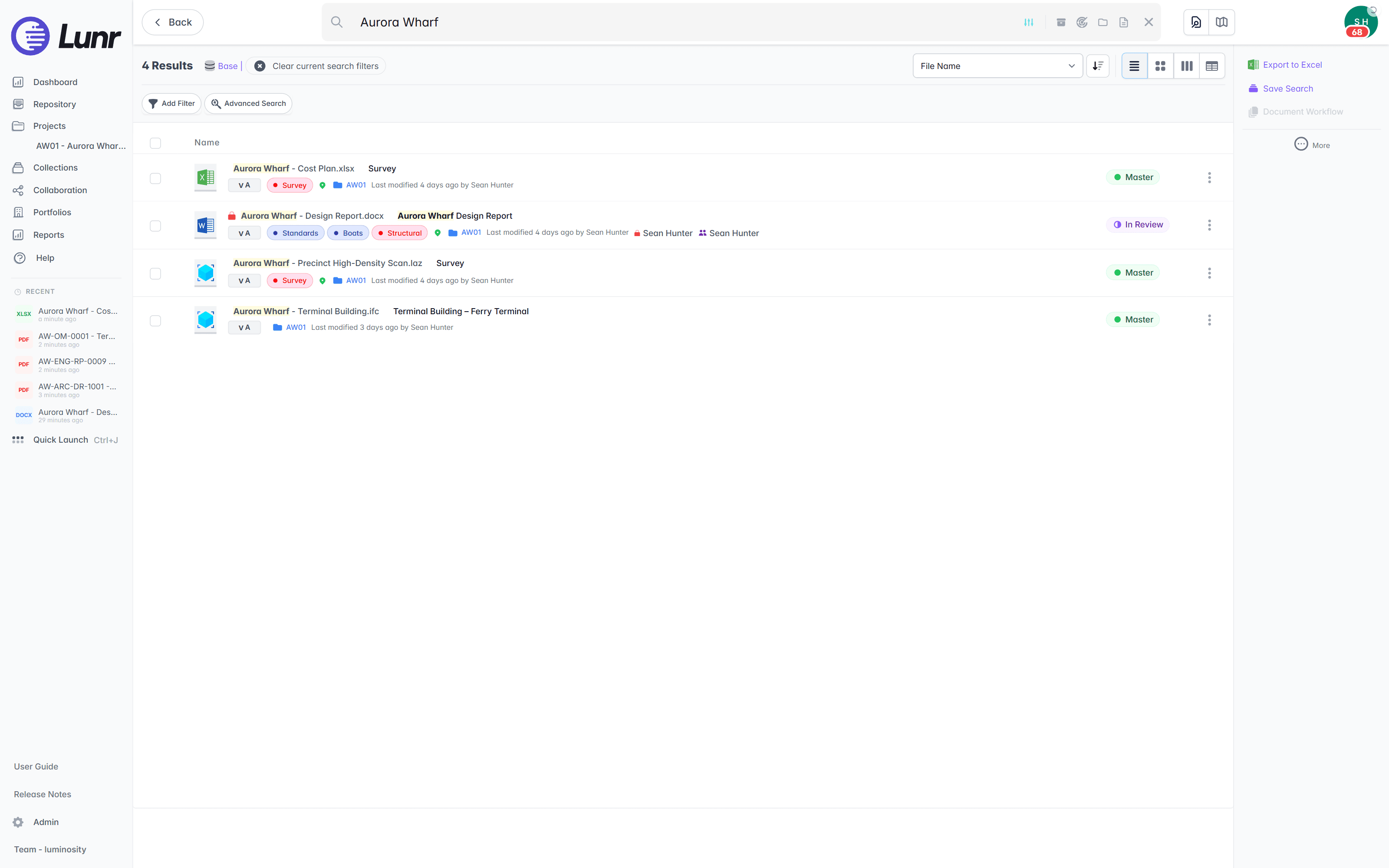
An owner inherits decades of scanned sheets, and their content is invisible to attribute and document indexing. XRAY runs OCR and full-text search across every drawing, scans included. Search a valve tag, a title-block reference, or a note, and Lunr returns the sheet whether it was issued this morning or scanned from a 1994 archive.
- OCR and AI full-text search across every DGN, DWG, RVT, PDF, and scanned image.
- Find a tag, a reference, or a note printed inside the drawing, not just the file name.
- Deep XRAY re-scans a dense sheet tile by tile, so nothing on the drawing is missed.
- Filter results by metadata, tags, and revision to narrow a large set fast.
OCR · AI full-text search · deep XRAY tile re-scan · metadata and tag filters
Receive the handover on the record, with an audit trail behind it.
The moment that matters for an owner is handover, when the design firm issues the set and the owner has to know it is complete. Lunr issues and receives transmittals that track themselves, validates each handover package against a manifest so a missing as-constructed drawing is caught on upload, and keeps a full audit trail behind every approval, revision, and change.
- Receive tracked transmittals from your consultants, and run change requests that hold, forward, and close.
- Validate each handover package against a manifest, and read title-block tags into metadata.
- Move drawings through configurable review and approval workflows.
- Keep a full audit trail on every controlled drawing, ready for compliance.
transmittals · manifest validation · change requests · configurable workflows · full audit trail
See handover and transmittals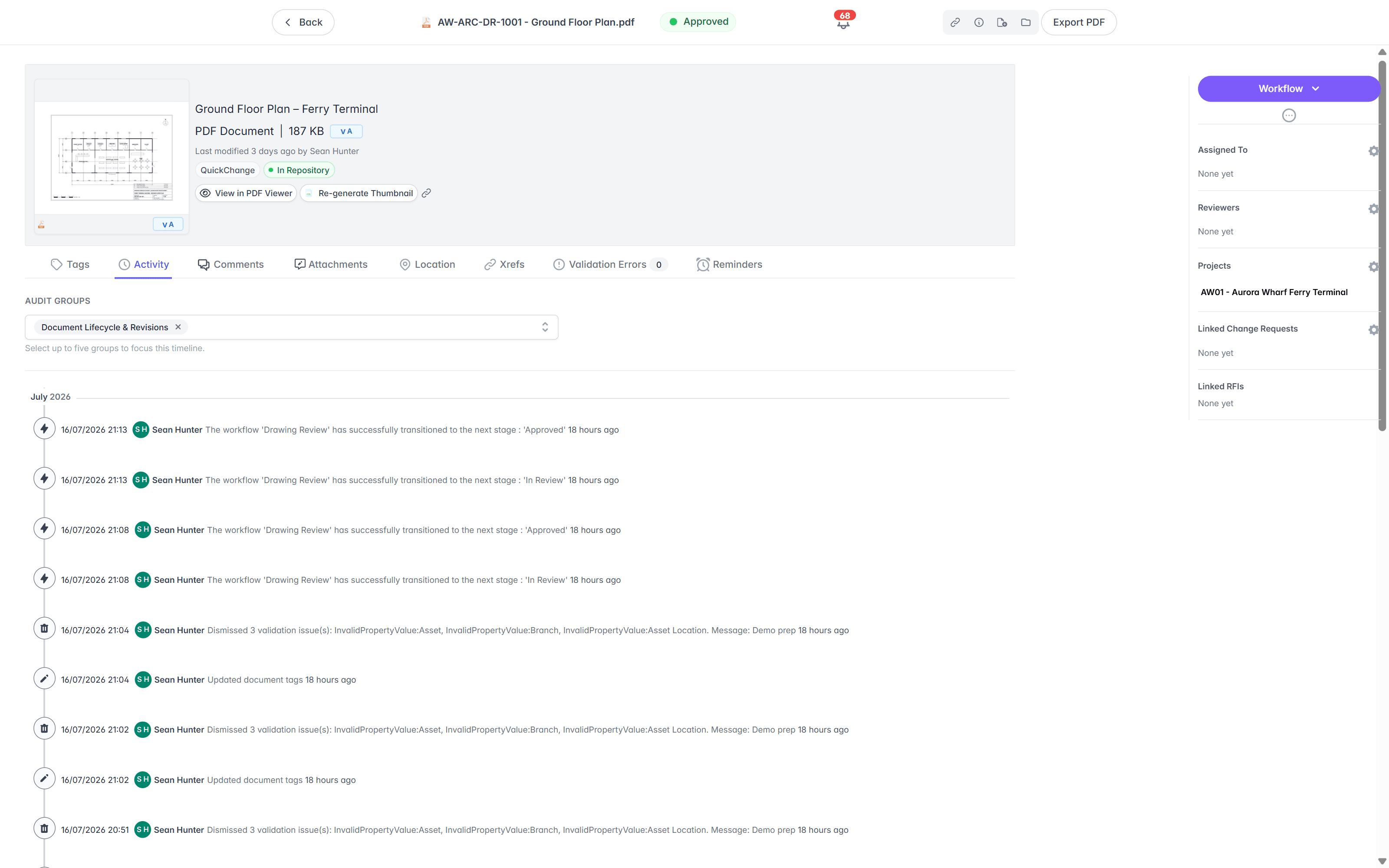
Move the record across, let the design firm keep ProjectWise.
You do not have to rip out ProjectWise or interrupt a live project. Import the drawings, keep the folders your team knows, and bring every format so it opens in the browser. The owner’s record moves to Lunr, and the consultants carry on with the tools they run.
- 01Import in bulk
Point Lunr at your ProjectWise export, and it reads the title-block tags from each sheet into metadata, so drawing number, revision, and discipline become fields you can filter on.
- 02Keep your folders
Your existing folder structure comes across, so people find drawings where they expect, while the register gives the controlled view on top.
- 03Bring every format
DGN, DWG, RVT, and PDF all open in the browser through the Rift and Foundry viewers, so nobody needs MicroStation or a CAD seat to read a sheet.
- 04Let the design firm keep ProjectWise
Your consultants can run ProjectWise for live design work in progress through delivery, and issue the controlled set to Lunr as the owner's record. Nothing forces an all-or-nothing move.
See the CAD, GIS, and facilities connectors that bring drawings and models in on the connectors page.
Alternatives to ProjectWise, and when to stay put.
Owners look for a ProjectWise alternative for three consistent reasons: the administration that datasources and managed workspaces demand, a desktop client and per-seat licensing that make wide access awkward, and a scope that ends when the project does. Which alternative fits depends on which of those you are solving.
The common data environment inside Autodesk Construction Cloud. The natural swap where the authoring is Revit and AutoCAD rather than MicroStation, and where the team wants delivery collaboration in the browser.
Oracle's project delivery platform, built for formal mail, transmittals, and submittal workflows across many organisations. Aimed at coordinating parties rather than design work in progress, and equally scoped to the project.
Data management and worksharing for civil engineering and surveying offices, with an ISO 19650 common data environment and deployment on 12d's cloud, your own servers, or your own cloud.
CAD data management with check-in, check-out, and dependency tracking across referenced files. The right shape where the problem is authoring work in progress rather than project collaboration.
Engineering document management with deep desktop CAD integration, revision control, workflows, and audit traceability, deployed on your own infrastructure, hosted by Synergis, or on Adept Cloud.
The owner's controlled record once drawings are issued. Browser-based viewing of DGN, DWG, and RVT with no client to install, OCR search inside scanned sheets, handover validated against a manifest, and hosting in Australia or the US.
When staying on ProjectWise is the right call
Stay when the work is live design in progress on Bentley tools, when managed workspaces are already keeping DGN configuration consistent across the design office, and when the people administering it are that office. ProjectWise is doing real work there, and swapping it out trades a working design environment for nothing. The narrower question is whether the issued record should live there too, or sit somewhere built to hold it for the decades after the project closes.
Read the whole field first
Every product above is covered alongside SharePoint, Procore, OpenText, M-Files, TeamBinder, and Accruent Meridian in the survey of engineering document management software, with the six criteria to put to each vendor. The comparisons hub goes deeper on the ones owners ask about most.
Owners already run their record on Lunr.
Universities, utilities, energy companies, and government departments run their drawing record on Lunr, from project delivery through the operating life of the asset.
documents under management on Lunr. Proof the drawing record holds up at owner-and-portfolio scale.
“Lunr is a simple solution that provides the flexibility to develop the system to our needs. Lunr is simple to use, and minimal training is required.”
Questions owners ask about Lunr and Bentley ProjectWise.
What ProjectWise is built for, which alternatives suit which job, where an owner is better served by a controlled record, and what it takes to move the record across while the design firm keeps working.
- Is Lunr a Bentley ProjectWise alternative?
- For an asset owner, yes. ProjectWise is engineering collaboration software built for design teams to run work in progress during a project, administered around Bentley authoring tools and managed workspaces. Lunr is built for the owner who receives and holds the issued record. It runs in the browser, controls revisions, and searches inside scans, without datasources, workspace configuration, or an administrator to keep them running. Owners choose Lunr when they need a controlled record for the operating life of the asset rather than a design-delivery environment.
- What are the alternatives to Bentley ProjectWise?
- It depends which job you are replacing. For design collaboration on a non-Bentley toolchain, Autodesk Docs is the usual swap, and 12d Synergy suits civil engineering and surveying offices. For coordinating documents across many organisations on a project, Aconex is built for that. For CAD work in progress with check-in, check-out, and dependency tracking, Autodesk Vault fits. For an owner holding the issued record, the field is purpose-built engineering document management: Lunr, Synergis Adept, and Accruent Meridian. The engineering document management software survey on this site sets all of them out side by side.
- When should you stay on ProjectWise instead of moving to an alternative?
- Stay when the work is live design in progress on Bentley tools, when managed workspaces are already keeping DGN configuration consistent across the design office, and when the people administering it are that office. ProjectWise is doing real work in that setting, and replacing it trades a working design environment for nothing. The question worth asking is narrower: whether the owner's issued record should also live there, or sit in a system built to hold it for the decades after the project closes.
- What is the difference between Lunr and ProjectWise?
- ProjectWise is design work-in-progress infrastructure, administered for the engineering office, with a MicroStation and DGN heritage, a desktop client, and managed workspaces. Lunr is the owner's controlled record, browser based, with a drawing register, revision control, transmittals, and full-text search across scans. Put simply, ProjectWise runs the design while the project is live, and Lunr holds the record once drawings are issued and for the decades the asset operates after that.
- Do you need MicroStation or a Bentley licence to view drawings in Lunr?
- No. The whole team opens DGN, DWG, RVT, and PDF drawings in the browser through the Rift viewer, with layers, measurement, and markup. Models open in Foundry and point clouds in Nimbus. A Bentley or CAD seat is only needed to author drawings, not to review them, so operations, facilities, and external contractors can all see a sheet without a licence.
- Can an asset owner use ProjectWise as their record?
- It can be done, but it is a heavy fit. ProjectWise is scoped to design delivery and administered around managed workspaces and the ProjectWise Explorer client, so an owner inherits configuration and licensing built for an engineering office. It is also project-centric, while an owner needs a record that outlives the project and the consultants. Owners tend to keep the design firm on ProjectWise through delivery and hold the issued, controlled record on Lunr.
- How does moving off ProjectWise work, and how long does it take?
- Import your drawings in bulk. Lunr reads the title-block tags from each sheet into metadata, so drawing number, revision, and discipline become searchable fields without retyping. Your existing folder structure comes across, and automatic numbering applies your register format as records land. Timing depends on the volume and how clean the title blocks are, but reading the title blocks is the step that removes most of the manual work. The University of Canberra brought more than 20,000 documents under a controlled record this way.
- Does Lunr run in the browser without a desktop client or managed workspace?
- Yes. Lunr is browser based, with nothing to install and no datasource or workspace configuration to administer. There is no ProjectWise Explorer client to deploy and no MicroStation workspace to maintain, so an owner can give the whole team access without standing up design infrastructure first.
- What happens to our DGN and MicroStation files?
- They come across and open in the browser at full fidelity, held under revision control in the drawing register. Your design firm can carry on authoring in MicroStation and issue the controlled set to Lunr, so the owner holds a clean record while the consultants keep the tools they know. Nothing is converted away from DGN or locked to a single authoring application.
Eleven more systems, compared the same way.
Owners rarely weigh one system on its own. Each comparison below is written to the same shape: what the tool is built for, the specific points where an owner’s drawing record needs something else, and how the two sit side by side. Start with whichever one you already run.
CAD data management · Autodesk
Autodesk Vault
CAD data management at the design desk, with check-in, check-out, and dependency tracking.
On-premise EDMS · Synergis
Synergis Adept
Engineering document management with task panes inside the CAD applications, built to run on servers you own.
AEC data management · 12d Solutions
12d Synergy
Australian AEC data management for the civil design office, reached through a Windows client.
Document library · Microsoft 365
SharePoint
Microsoft's document library and intranet, holding the Office documents the whole organisation works on.
Enterprise content · OpenText
OpenText
Enterprise content management covering every document class a business holds, engineering among them.
Metadata-driven DMS · M-Files
M-Files
One governed document platform for the whole business, organised by metadata rather than by folder.
Project CDE · Oracle
Aconex
Oracle's project collaboration platform, carrying formal correspondence, transmittals, and submittals across the delivery team.
Project collaboration · InEight Document
TeamBinder
Delivery-side document control across the project team, sold today as InEight Document.
Construction management · Procore
Procore
Construction management built around the contractor running the build, from the field back to the office.
Construction cloud · Autodesk
Autodesk Docs
The common data environment inside Autodesk Construction Cloud, run for the project team.
Cloud EDMS · Accruent
RedEye
Cloud engineering document management for asset owners, sold today by Accruent alongside Meridian.
For the twelve set against each other in one place, start from the comparisons hub. For the wider field, including Accruent Meridian, and the six criteria to put to each vendor, read the survey of engineering document management software.
Let the project run ProjectWise. Give the owner the record.
Book a walkthrough with someone who knows what a transmittal and an as-constructed drawing are, and watch Lunr run against a set of your own.
10M+ documents under management · Hosted in Australia and the US · SAML · Full audit trail · Export anytime
- entity
- Lunr Labs Pty Ltd
- location
- Melbourne AU
- workspace
- documents.lunr.app
- rev
- 2026